Switching between sitting and standing is easier when your workstation can support two monitors without crowding your keyboard, mouse, or other essentials. The best desk converters for dual monitors combine a stable lifting platform with enough width, depth, and monitor support for your setup.
This roundup compares 10 options ranging from compact manual risers to spacious electric converters. Use the buying guide below to narrow your choices by desk space, monitor size, lifting method, and ergonomics.
Best 10 Desk Converters for Dual Monitors Picks for 2026
Best Integrated Mount
VIVO 32-Inch Dual Monitor Converter

- Integrated dual-monitor stand
- 4.5- to 20-inch manual height range
- Supports two monitors up to 30 inches
Best For: All-in-one dual-monitor sit-stand setups
Best Electric Lift
AVLT Motorized Dual Monitor Converter

- Powered adjustment up to 23.6 inches
- Three presets and standing timer
- Supports dual 32-inch monitors
Best For: Frequent sit-stand changes with saved heights
Best Large Surface
VIVO 48-Inch Standing Desk Converter

- 47.6-inch-wide work surface
- 4.5- to 20-inch manual adjustment
- Holds up to 33 pounds
Best For: Dual-monitor and laptop-heavy workstations
Best Compact Electric Option

- One-touch lift to 21.1 inches
- Supports two monitors up to 32 inches
- Compact 28.3-by-18.9-inch base
Best For: Small desks needing powered dual-monitor adjustment
Spacious Lift

- 32-inch area for dual monitors and accessories
- 4.3- to 19.7-inch pneumatic height range
- Includes dual-monitor stand and keyboard tray
Best For: Home offices needing a roomy dual-monitor riser
Precision Positioning
Perfect POSTURE Dual Monitor Riser

- 18-inch lift across 23 locking points
- Monitors and keyboard move together
- Monitor mount tilts vertically and horizontally
Best For: Users wanting precise ergonomic monitor alignment
Balanced Workspace
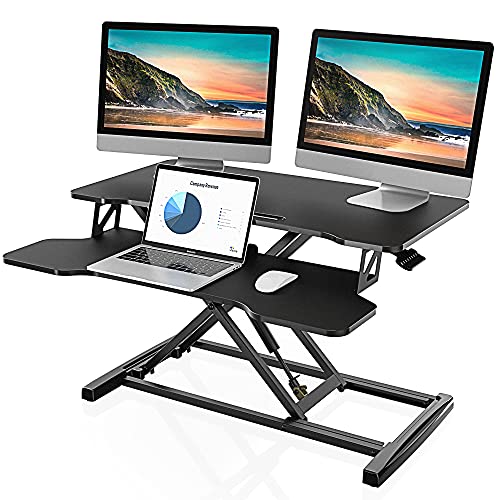
- 31.5-by-15.7-inch surface for dual monitors
- 4.3- to 19.8-inch adjustment range
- 33-pound capacity with dual gas springs
Best For: Straightforward dual-monitor home-office setups
Best Overall Electric Pick
X-Large Electric Dual-Monitor Converter

- One-touch adjustment from 6.3 to 19.3 inches
- Supports two monitors up to 32 inches
- 47.2-inch surface with USB charging
Best For: Roomy workstations needing powered height adjustment
Best Manual Value
36-Inch Gas-Spring Dual-Monitor Riser
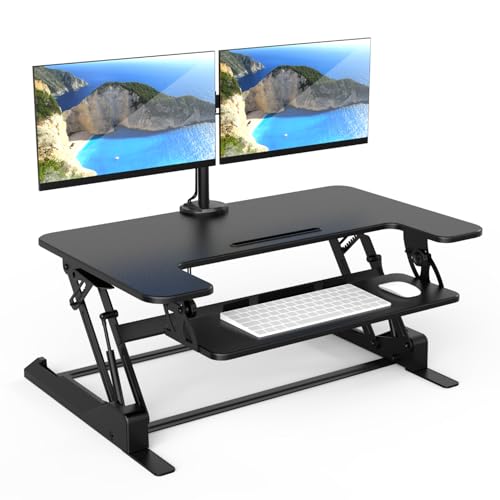
- Manual lift from 6.5 to 16.3 inches
- Built-in mount for two monitors up to 32 inches
- 36-inch surface with keyboard tray
Best For: Manual sit-to-stand setups with integrated monitor support
Best Compact Design
Space-Saving Dual-Monitor Converter

- Compact 23.6-by-15.7-inch platform
- Supports two monitors up to 32 inches
- Gas-spring lift with keyboard tray
Best For: Smaller desks needing dual-monitor ergonomics
Best Integrated Mount – VIVO 32-Inch Dual Monitor Converter
If you want desk converters for dual monitors without adding a separate monitor stand, this VIVO model combines a height-adjustable riser with a dual-arm display mount. Its 31.5-inch work surface and 4.5- to 20-inch adjustment range suit sit-stand office setups, while the monitor arms support two compatible screens.
Best For: Users who want an integrated dual-monitor mount, a wide keyboard tray, and manual height adjustment.
Pros:
- Supports two 13- to 30-inch monitors up to 17.6 pounds each.
- Monitor arms tilt, swivel, rotate, and adjust vertically for flexible positioning.
- Steel frame, desk-protecting padding, and minimal assembly.
- Wide 31.5-inch top and keyboard tray provide a dedicated workstation.
Cons:
- Monitor compatibility depends on VESA 75x75mm or 100x100mm patterns.
- Manual adjustment requires lifting the converter rather than using a motor.
- The monitor mount is designed for screens up to 30 inches.
This is a practical all-in-one option for a conventional desk that needs two adjustable monitors and a standing position. Check your monitor size, weight, and VESA pattern before buying.
Best Electric Lift – AVLT Motorized Dual Monitor Converter
Among desk converters for dual monitors, this AVLT model stands out for its motorized height adjustment. It raises from 3.9 to 23.6 inches, supports up to 55 pounds, and includes memory presets and a standing reminder for users who frequently alternate between sitting and standing.
Best For: Users who prioritize powered height changes, saved presets, and a large-capacity dual-monitor workstation.
Pros:
- Electric lift adjusts from 3.9 to 23.6 inches.
- Three height positions, memory presets, and an integrated timer support regular standing.
- Supports dual 32-inch VESA-compatible monitors.
- Includes a keyboard tray and integrated cable management.
Cons:
- Its 74.8-pound listed weight makes it a substantial desk accessory.
- The desktop measures 28.3 by 15.7 inches, which may limit larger accessory layouts.
- Assembly is required.
The AVLT is a strong fit when convenience matters more than minimal weight. Its powered lift and preset functionality make frequent position changes easier, while the 55-pound capacity accommodates a substantial dual-screen setup.
Best Large Surface – VIVO 48-Inch Standing Desk Converter
This VIVO riser is a useful choice for desk converters for dual monitors when you also need room for a laptop and other accessories. Its 47.6-inch-wide surface leaves more workspace than a typical riser, while the pneumatic lift moves the platform from 4.5 to 20 inches.
Best For: Users who need a broad surface for dual monitors, a laptop, and office essentials.
Pros:
- 47.6 by 15.7 inches of desktop space accommodates larger setups.
- Matching keyboard tray raises with the main surface.
- Manual height adjustment spans 4.5 to 20 inches.
- Steel frame supports up to 33 pounds on the desktop.
Cons:
- It does not include an integrated dual-monitor mounting arm.
- The 33-pound desktop capacity may be limiting for heavier equipment.
- Its wide footprint requires sufficient desk depth and width.
Choose this model if workspace is your main concern and your monitors already have stands or a separate mounting solution. It provides generous room for multitasking but is less of an all-in-one dual-monitor system.
Best Compact Electric Option – Mount-It! Dual Monitor Riser
For shoppers comparing desk converters for dual monitors on a smaller desk, the Mount-It! MI-7952 combines a compact 28.3-by-18.9-inch base with a one-touch electric lift. It supports two monitors up to 32 inches and provides independent display positioning for tilt, swivel, and portrait rotation.
Best For: Small desks, cubicles, and users who want powered adjustment with flexible monitor positioning.
Pros:
- Electric height adjustment ranges from 1.4 to 21.1 inches.
- Supports two monitors up to 32 inches, including curved screens.
- Each screen can tilt, swivel, and rotate independently.
- 55-pound total capacity and built-in cable management support a stable, tidy setup.
Cons:
- The base still requires nearly 19 inches of desk depth.
- Monitor capacity is limited to 17.6 pounds per screen.
- Partial assembly is required.
This converter offers a useful balance of compactness, powered movement, and display adjustability. It is especially suitable when a full standing desk will not fit, but you still want two elevated screens.
Spacious Lift – TechOrbits 32-Inch Converter
For shoppers comparing desk converters for dual monitors, the TechOrbits OF-S05-1 offers a 32-inch work area with an included dual-monitor stand and keyboard tray. Its pneumatic lift adjusts from 4.3 to 19.7 inches for switching between seated and standing work.
Best For: Home offices, study rooms, and users who need space for dual monitors and accessories.
Pros:
- 32-inch surface accommodates dual monitors, keyboard, mouse, speakers, and accessories.
- Height adjusts from 4.3 to 19.7 inches using a handle and pneumatic lift.
- Includes a dual-monitor stand and keyboard tray.
- Arrives mostly assembled, requiring keyboard-tray installation.
Cons:
- Maximum recommended load is 33 pounds.
- Particle-board work surface may not suit shoppers seeking a solid-wood converter.
The TechOrbits is a practical choice when workspace and broad height adjustment matter most. Confirm your monitor setup and total equipment weight fit within its freestanding surface and 33-pound limit.
Precision Positioning – Perfect POSTURE Dual Monitor Riser
Among desk converters for dual monitors, the Perfect POSTURE riser stands out for controlled positioning. It provides 18 inches of vertical adjustment across 23 locking points, while the monitors, keyboard tray, and work surface move together.
Best For: Users who prioritize precise height settings, coordinated movement, and monitor-angle adjustment.
Pros:
- Offers 18 inches of lift with 23 locking points.
- One-hand quick-release lever enables fast height changes.
- Monitor, keyboard tray, and work surface raise and lower together.
- Monitor mount tilts vertically and horizontally for alignment.
Cons:
- At 39 pounds, it is relatively heavy to reposition.
- The listed 24.5-by-27.5-inch dimensions may provide less surface width than 32-inch converters.
This model is geared toward ergonomic fine-tuning rather than maximum tabletop area. Its locking-point system and adjustable monitor mount make it a strong fit for a carefully configured dual-monitor workstation.
Balanced Workspace – FITUEYES 32-Inch Converter
The FITUEYES 32-inch converter is a straightforward option for shoppers seeking desk converters for dual monitors. Its 31.5-by-15.7-inch top supports dual-monitor or laptop-and-monitor setups, with dual gas springs providing smooth adjustment from 4.3 to 19.8 inches.
Best For: Users seeking a spacious, simple sit-stand platform with a 33-pound load capacity.
Pros:
- Top surface supports dual monitors and laptop-plus-monitor arrangements.
- Raises to 19.8 inches and lowers to 4.3 inches.
- Dual gas-spring force enables smooth height changes.
- Supports up to 33 pounds and includes a keyboard tray.
Cons:
- Only the keyboard tray is listed among the included components.
- Its 27-pound weight may make frequent repositioning less convenient.
The FITUEYES balances a broad work surface, substantial load capacity, and simple gas-spring adjustment. It is a sensible pick for a conventional dual-monitor setup when you do not need a specialized monitor-mount system.
Best Overall Electric Pick – X-Large Electric Dual-Monitor Converter
If you want a spacious, powered option among desk converters for dual monitors, the Mount-It! MI-8054 combines one-touch height adjustment with a wide 47.2-inch desktop. Its integrated arm supports two VESA-compatible screens up to 32 inches each, while the keyboard tray and USB charger help keep a larger workstation organized.
Best For: Users who want electric sit-to-stand adjustment, a generous work surface, and flexible dual-monitor positioning.
Pros:
- Electric height adjustment from 6.3 to 19.3 inches.
- Dual monitor arm supports two screens up to 32 inches, with tilt, swivel, and rotation.
- Large 47.2-by-23.2-inch surface includes a keyboard tray, device channel, and USB charger.
- Steel construction supports up to 33 pounds on the desktop.
Cons:
- The X-large footprint may require substantial desk space.
- Assembly is required, despite the minimal-assembly design.
The MI-8054 is a strong choice when convenience and workspace capacity matter most. Its electric lift and integrated monitor arm make frequent sit-to-stand transitions easier, although the large format is better suited to roomy desks.
Best Manual Value – 36-Inch Gas-Spring Dual-Monitor Riser
For shoppers comparing desk converters for dual monitors, the Mount-It! MI-7934 offers a manually operated alternative with a built-in two-screen mount. Its 36-inch surface leaves room for monitors and a laptop, while the gas-spring lift provides a smooth way to change between sitting and standing.
Best For: Users who want a sturdy manual converter with integrated monitor mounting and a broad work surface.
Pros:
- Gas-spring height adjustment ranges from 6.5 to 16.3 inches.
- Integrated mount supports two monitors up to 32 inches with tilt, swivel, and rotation.
- 36-inch work surface and large keyboard tray accommodate a practical workstation.
- Nonskid pads and built-in cable management support a stable, tidier setup.
Cons:
- Manual lifting requires more effort than an electric converter.
- Each monitor arm supports up to 17.6 pounds, so screen weight should be checked.
This model balances monitor functionality, workspace, and manual adjustability in a substantial 46.1-pound design. It is a sensible fit for users who do not need powered controls and prefer a broad platform with integrated cable management.
Best Compact Design – Space-Saving Dual-Monitor Converter
If desk space is limited, the Mount-It! MI-7914 is a compact option among desk converters for dual monitors. It supports two VESA-compatible screens up to 32 inches while using a 23.6-by-15.7-inch top platform, and its gas-spring lift adjusts the workstation from 5.7 to 17.1 inches.
Best For: Users needing dual-monitor support and sit-to-stand flexibility without a large desktop platform.
Pros:
- Compact top platform fits existing desks more easily than larger converters.
- Supports two monitors up to 32 inches and 22 pounds each.
- Gas-spring adjustment spans 5.7 to 17.1 inches.
- Wide keyboard tray includes a gel wrist pad and cable management.
Cons:
- The smaller platform provides less room for accessories or a laptop.
- Manual adjustment is less convenient than powered lifting.
- The unit supports up to 33 pounds overall, so total equipment weight matters.
The MI-7914 prioritizes a smaller footprint while retaining dual-monitor capability and a useful keyboard tray. It is a practical choice for compact offices, provided your additional equipment can fit on the limited platform.
How We Picked the Best Desk Converters for Dual Monitors
We focused on the features that matter most in a two-screen sit-stand workstation: usable platform size, monitor compatibility, stability, height adjustment, lifting method, and cable-management potential. The selection includes manual and electric models, integrated monitor stands, dual monitor arms, and wide platforms designed for larger displays.
Because monitor weights and mounting systems vary, verify each product’s stated capacity, VESA compatibility, and recommended screen size before buying. A converter that fits two monitors on paper may still feel cramped if you use large displays, a full-size keyboard, speakers, or other desk accessories.
Quick Comparison
- Best for a simple dual-screen setup: Choose a converter with an integrated dual monitor stand and a dedicated keyboard surface.
- Best for heavier monitors: Consider an electric model with a robust lifting mechanism and clearly stated weight capacity.
- Best for limited desk space: Look for a compact riser with monitor mounts rather than a very wide platform.
- Best for large monitors and accessories: A 47- or 48-inch platform provides more room for screens, speakers, and peripherals.
Key Buying Factors for Desk Converters for Dual Monitors
Platform Width and Depth
Measure the available desk area before choosing a converter. Width determines whether two monitors can sit comfortably side by side, while depth affects viewing distance and space for a keyboard. Larger platforms offer flexibility but can consume much of a shallow desk.
Monitor Mounting and Capacity
Integrated arms or stands can free valuable surface space, but check the supported monitor sizes, individual weight limits, and VESA patterns. If your monitors use nonstandard mounting hardware, you may need adapters or a platform-based model instead.
Electric Versus Manual Adjustment
Electric converters are convenient when you change positions frequently or use heavier equipment. Manual models are often simpler, quieter, and less expensive, but they may require more effort to raise and lower. Compare the adjustment range with your seated and standing heights.
Stability and Ergonomics
Look for a broad, solid base and minimal wobble at standing height. Your monitors should remain stable while typing. Position the top of the screens near eye level, keep your elbows close to 90 degrees, and leave enough room to move the keyboard and mouse naturally.
Cable Management and Desk Clearance
Dual monitors add power and video cables, so inspect the design for routing channels or enough clearance around the mounts. Also measure the space beneath the converter to ensure it will not interfere with desk drawers, monitor bases, or other equipment.
Who Should Buy Which Desk Converters for Dual Monitors?
Choose an integrated dual-monitor riser if you want a straightforward workstation with fewer separate components. Choose an electric wide converter if convenience, frequent height changes, or heavier displays are priorities. Choose a compact manual model if desk space and budget matter most. Choose a 47- or 48-inch platform if you use large screens or need room for a keyboard, laptop, speakers, and accessories.
Before ordering, compare the converter’s dimensions with your desk, confirm its monitor specifications, and check the total load capacity rather than relying only on the product name. The right choice should fit your equipment comfortably while making it easy to alternate between sitting and standing throughout the workday.