Experienced sim pilots need more than basic controls. The right yoke or HOTAS setup can deliver smoother pitch and roll inputs, better switch access, and a more convincing cockpit experience.
We selected 10 flight-control options across premium yoke systems, console-ready hardware, HOTAS configurations, rudder-pedal bundles, and cockpit stands. Use the guide below to match each setup to your aircraft preferences, platform, space, and budget.
Best 10 Flight Simulator Yokes for Experienced Gamers Picks for 2026
Best Overall
Logitech G PRO Flight Yoke System

- Smooth stainless-steel yoke and separate throttle quadrant
- Extensive programmable control layout
- Desk clamps and broad Windows simulator compatibility
Best For: Experienced pilots wanting a traditional yoke setup
Best Cockpit Rig
Marada 2-in-1 Flight Simulator Cockpit

- Supports yoke, HOTAS, keyboard, and racing configurations
- Adjustable seat, panels, pedals, and backrest
- Heavy-duty frame with anti-slip stability features
Best For: Experienced sim users building a dedicated cockpit
Best for Advanced Customization
Turtle Beach VelocityOne Flightdeck
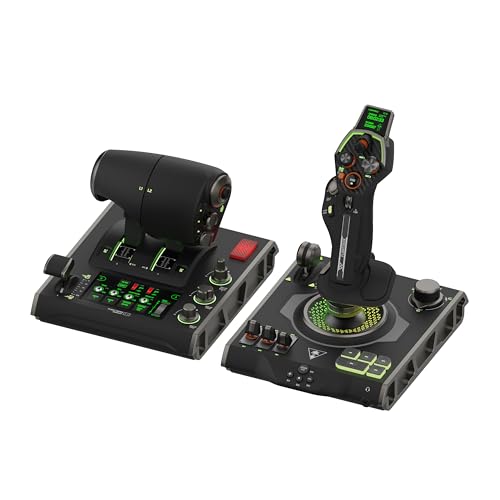
- 139 programmable controls for detailed mappings
- Touch display and OLED head-up display
- Modular stick, throttle, and Hall-effect controls
Best For: Advanced PC users seeking maximum control customization
Best for Combat Simulation

- Twin throttles with friction adjustment and lock
- Adjustable four-spring stick force system
- Hall-effect axes and extensive programmable controls
Best For: Experienced combat-flight and space-sim players
Complete Xbox HOTAS Kit

- Full HOTAS setup with rudder pedals
- Five axes and 14 programmable buttons
- Xbox Series X|S and PC compatibility
Best For: Gamers wanting a complete Xbox or PC flight-control package
Flexible Cockpit Stand
Foldable Flight Simulator Stand

- Supports flight and racing peripherals
- Stable X-shaped foldable design
- Wide pre-drilled mounting panels
Best For: PC users building a versatile, space-saving simulator cockpit
Realistic Yoke Bundle

- Traditional yoke with throttle quadrant
- Rudder pedals include differential toe brakes
- At least 54 programmable controls
Best For: Windows desktop pilots seeking a complete yoke-based setup
Versatile HOTAS Value

- 12 programmable buttons and five axes
- Detachable throttle with adjustable resistance
- Plug-and-play PC HOTAS design
Best For: PC gamers who prefer a joystick-and-throttle setup
Full Cockpit Control

- 180-degree yoke with Hall effect sensor
- Built-in throttle, trim, rudder, and brake controls
- Works with Xbox and Windows PCs
Best For: Microsoft Flight Simulator players wanting an all-in-one yoke
Budget Programmable Stick

- Four-axis control and 12 programmable buttons
- Vibration function with driver adjustment
- Suction cups stabilize the stick on smooth desks
Best For: Windows PC players seeking an affordable customizable flight stick
Best Overall – Logitech G PRO Flight Yoke System
For experienced gamers looking for flight simulator yokes, the Logitech G PRO Flight Yoke System offers a familiar, hardware-focused setup with smooth stainless-steel controls, a separate throttle quadrant, and extensive programmability. Its desk clamps and broad Windows compatibility make it a practical choice for building a dedicated desktop simulator station.
Best For: Experienced pilots who want a traditional yoke-and-throttle setup with many programmable controls.
Pros:
- Stainless-steel yoke shaft is designed for robust, smooth, accurate control.
- Includes a separate flight throttle quadrant and two desk clamps.
- Offers extensive customization through 14 buttons, a POV hat, a mode switch, and programmable controls.
- Compatible with Windows 11, 10, 8.1, and 7, plus major simulator software after the optional download.
Cons:
- Designed for Windows PCs rather than a broad range of platforms.
- Requires optional software for Microsoft Flight Simulator, FSX, X-Plane 10, and Prepar3D.
This is the most straightforward pick for experienced gamers who specifically want a yoke rather than a combat-oriented joystick. The included throttle quadrant and secure mounting hardware help create a more complete cockpit feel without requiring a separate throttle purchase.
Best Cockpit Rig – Marada 2-in-1 Flight Simulator Cockpit
Among flight simulator yokes for experienced gamers, the Marada cockpit stands out as a full mounting platform rather than an electronic controller. Its interchangeable panels support a flight yoke, HOTAS equipment, or a keyboard tray, while the adjustable frame can also serve as a racing simulator cockpit.
Best For: Experienced sim users who need a stable, adjustable cockpit frame for flight and racing equipment.
Pros:
- 2-in-1 design supports both flight simulation and sim racing.
- Interchangeable mounting panels accommodate a yoke, HOTAS setup, or keyboard tray.
- Six-way adjustable side panels, pedals, seat, backrest, and middle plate provide flexible positioning.
- Heavy-duty square-tube frame and anti-slip pads are intended to reduce wobble during use.
Cons:
- Electronics such as the yoke, joystick, HOTAS, wheel, and pedals are not included.
- Its 96.5-pound frame and large listed dimensions require substantial space.
- Listed warranty coverage is three months, with permanent online technical support.
The Marada is best viewed as the foundation for an advanced simulator rather than a standalone flight-control solution. It makes sense when you already own compatible equipment and want a more stable, customizable seating and mounting position.
Best for Advanced Customization – Turtle Beach VelocityOne Flightdeck
For experienced gamers comparing flight simulator yokes for experienced gamers with broader control systems, the Turtle Beach VelocityOne Flightdeck emphasizes customization and information at the desktop. It combines a modular stick, throttle controls, a touch display, and 139 programmable buttons for PC-based air and space simulation.
Best For: Advanced PC sim players who value extensive mapping, modular controls, and an integrated display.
Pros:
- Provides 139 programmable buttons for detailed control mapping.
- Includes a customizable flight touch display and OLED head-up display.
- Contactless Hall-effect controls are designed for precision and durability.
- Offers adjustable stick height, haptic throttle detent response, RGB lighting, and headset audio features.
Cons:
- It is primarily a joystick-and-throttle HOTAS system, not a conventional aircraft yoke.
- Listed compatibility centers on Windows 10 and 11 PCs.
- The extensive control layout may be more than needed for simpler simulator setups.
The Flightdeck is a strong choice when programmable inputs and modern interface features matter more than a traditional yoke shape. Its large control count and modular design are particularly suited to experienced users who enjoy tailoring their setup for different aircraft or space simulations.
Best for Combat Simulation – Logitech G X56 H.O.T.A.S.
Although the Logitech G X56 is a joystick-and-throttle HOTAS rather than a conventional yoke, it belongs in a comparison of flight simulator yokes for experienced gamers who also play combat or space simulations. Its twin throttles, adjustable spring system, mini analog stick, and numerous controls are geared toward detailed aircraft and spacecraft operation.
Best For: Experienced combat-flight and space-simulation players who prefer a HOTAS layout.
Pros:
- Includes twin throttles with a friction adjuster and throttle lock.
- Four spring options allow adjustable stick force.
- 16-bit aileron and elevator axes use Hall-effect sensors.
- Offers separate control surfaces, RGB lighting, and more than 180 programmable controls according to the supplied product notes.
Cons:
- It does not provide a traditional aircraft yoke.
- Requires two USB 2.0 ports and a compatible Windows PC.
- The extensive control arrangement may have a learning curve for users accustomed to basic controls.
The X56 is a better match for experienced players focused on combat aircraft, VR, or spaceflight than for civilian aviation users seeking yoke feedback. Its adjustable stick resistance and twin-throttle arrangement give it the specialized control layout those simulations often demand.
Complete Xbox HOTAS Kit – T-Flight Full Kit
For experienced gamers seeking flight simulator yokes for experienced gamers alternatives, the Thrustmaster T-Flight Full Kit provides a complete hands-on HOTAS setup with rudder pedals. Its Xbox integration, five axes, and programmable controls suit both combat and civil flight scenarios.
Best For: Xbox Series X|S and PC players who want a full flight-control package with throttle, stick, and pedals.
Pros:
- Includes a detachable throttle, flight stick, and TFRP rudder pedals.
- Offers five axes, 14 programmable buttons, a rapid-fire trigger, and a hat switch.
- Dedicated Xbox Guide, View, and Menu buttons support console navigation.
- Full-foot pedal design and adjustable heel rests support longer sessions.
Cons:
- Its 12.4-pound package and sizable dimensions may require dedicated desk space.
- The supplied compatibility details focus on PC and Xbox Series S/X rather than other platforms.
This is a strong choice when you want a broad, combat-ready control layout and included yaw control in one package. It is less appropriate if you specifically want a traditional yoke-style controller.
Flexible Cockpit Stand – Foldable Flight Simulator Stand
For experienced gamers comparing flight simulator yokes for experienced gamers setups, the Anman stand provides a stable platform rather than a yoke itself. Its adjustable panels support flight and racing hardware, while the folding design helps conserve storage space.
Best For: PC players who need a multi-purpose stand for flight sticks, yokes, pedals, steering wheels, and related accessories.
Pros:
- X-shaped, double-triangle construction is designed for stability during simulation.
- Wide, pre-drilled panels accommodate various flight and racing equipment.
- Supports devices including Logitech G29/G920/G923, Thrustmaster T16000, and several listed flight systems.
- Arrives 80% pre-installed and folds for easier storage.
Cons:
- This is a stand, so a yoke or other controller must be purchased separately.
- Its listed compatibility is centered on PC, with limited console compatibility details.
- The three-month warranty is relatively short.
The Anman stand makes sense for players building a flexible cockpit that can switch between flight and racing. Choose it when mounting stability and storage matter more than receiving a controller in the box.
Realistic Yoke Bundle – Logitech G Pro Flight Yoke
Among flight simulator yokes for experienced gamers, the Logitech G Pro Flight Yoke System stands out as a dedicated yoke-and-pedal bundle. It combines realistic yoke control with a throttle quadrant, programmable inputs, rudder pedals, and differential toe brakes for more complete aircraft handling.
Best For: Windows and desktop users who want a traditional yoke setup with integrated rudder pedals and extensive programmable controls.
Pros:
- Provides realistic yoke controls suited to aspiring and experienced pilots.
- Includes smooth, self-centering rudder pedals with adjustable foot rests.
- Differential toe brakes add control during runway operations.
- POV hat, 14 buttons, and a three-position mode switch provide at least 54 programmable controls.
Cons:
- The supplied compatibility information lists Windows rather than Xbox or other platforms.
- Its traditional yoke format may be less suitable for users focused primarily on joystick-style combat simulators.
This bundle is the most direct match for experienced sim pilots who specifically want yoke-based control. The included pedals and extensive programmable inputs make it a cohesive desktop setup rather than a standalone yoke.
Versatile HOTAS Value – T-Flight Hotas X
The Thrustmaster T-Flight Hotas X is a practical choice for experienced gamers who want flight simulator yokes for experienced gamers without committing to a full yoke-based cockpit. Its joystick-and-throttle layout offers programmable controls, adjustable resistance, and flexible desktop placement.
Best For: PC gamers who prefer a HOTAS joystick setup for civil flight and military flight games.
Pros:
- 12 programmable buttons and five axes support customized control layouts.
- Detachable, full-size throttle can be separated or used as a compact unit.
- Adjustable stick resistance, dual rudder control, preset switching, and onboard memory add flexibility.
Cons:
- This is a joystick-and-throttle HOTAS rather than a traditional yoke.
- Compatibility is centered on PC, with PlayStation 3 also listed.
Choose this model if you value adaptable controls and easy setup more than a realistic airliner-style yoke. Its weighted base and plug-and-play design make it a straightforward desktop option.
Full Cockpit Control – VelocityOne Flight
The Turtle Beach VelocityOne Flight is the most complete option here for experienced gamers seeking flight simulator yokes for experienced gamers. It combines a yoke handle, throttle quadrant, trim wheel, and rudder controls in one system, with support for Xbox consoles and Windows PCs.
Best For: Microsoft Flight Simulator players who want an all-in-one yoke system for Xbox or Windows.
Pros:
- Includes a 180-degree yoke, modular throttle quadrant, trim wheel, and rudder and brake controls.
- Non-contact Hall effect sensor and 12 analog axes support detailed control.
- Color flight management display, status indicator panel, and secure clamping system improve usability.
Cons:
- Its roughly 10-pound weight and larger footprint require more desk space.
- The feature-rich system is more involved than a basic joystick controller.
For players who want a more cockpit-like experience, the VelocityOne Flight offers the broadest control set of the three. Its Xbox and Windows compatibility also makes it the most versatile platform choice.
Budget Programmable Stick – PXN 2113PRO PC Joystick
The PXN 2113PRO is a budget-minded alternative for experienced gamers comparing flight simulator yokes for experienced gamers but who are comfortable using a conventional flight stick. It provides four-axis control, programmable buttons, vibration, and suction-cup stability for Windows PCs.
Best For: Windows PC players who want customizable flight-stick controls for games such as Microsoft Flight Simulator, X Plane 10, and War Thunder.
Pros:
- Offers four-axis control, an eight-way hat switch, and 12 programmable buttons.
- Vibration can be enabled and adjusted through the driver.
- Four suction cups help secure the stick on smooth desks.
Cons:
- Supports Windows 7, 8, 10, and 11 only; Mac, console, and Apple-device support is not provided.
- Force feedback is not supported.
- It is a single joystick rather than a dedicated yoke and throttle quadrant.
The PXN 2113PRO makes sense when programmable inputs and low-complexity PC setup matter more than a full simulation cockpit. Confirm your platform and game requirements before buying, especially if you need console support or force feedback.
How We Picked the Best Flight Simulator Yokes for Experienced Gamers
We evaluated these setups by looking at control layout, compatibility, adjustability, mounting options, included accessories, and the type of simulation each product supports. A traditional yoke is often the best fit for general aviation and airliner flying, while a HOTAS or flight stick can be more suitable for fighters, space simulators, and games designed around joystick input.
We also considered whether a product can grow with an advanced setup. Features such as programmable buttons, adjustable resistance, integrated throttles, rudder pedals, and a stable cockpit mount matter more as flight-sim experience increases.
Quick Comparison
| Setup Type | Best For | What to Look For |
|---|---|---|
| Yoke system | Airliners and general aviation | Smooth travel, sturdy mounting, switch access |
| HOTAS | Fighters and multi-role simulation | Programmable controls, throttle range, ergonomics |
| Yoke and rudder bundle | Complete civilian cockpit control | Pedal adjustment, desk space, calibration |
| Cockpit stand or seat | Dedicated simulator rooms | Stability, adjustability, footprint |
| Entry-level flight stick | Casual or flexible gaming | USB setup, compatibility, value |
Key Buying Factors for Experienced Gamers
Choose the Control Style for Your Aircraft
For Microsoft Flight Simulator-style civilian aircraft, a yoke provides a more authentic control motion than a conventional stick. If you regularly switch between aircraft types or play combat-focused titles, a HOTAS can offer faster access to throttle, trim, weapons, and auxiliary commands.
Check Platform and Game Compatibility
Confirm support for your exact platform before buying. PC compatibility is common, but Xbox support varies considerably. Also check whether the game recognizes every axis, button, and accessory without third-party mapping software.
Prioritize Stability and Mounting
Advanced controls are difficult to enjoy if they slide across a desk. Look for firm clamps, a compatible stand, or a dedicated cockpit. Measure your available space, especially when adding rudder pedals, a throttle quadrant, or a racing-style seat.
Consider Expandability
Programmable buttons and adjustable controls are useful for complex aircraft, but they are only valuable if the layout remains comfortable. A rudder-pedal bundle may be a better upgrade than adding more buttons if precise taxiing and coordinated turns are your priorities.
Who Should Buy Which Flight Simulator Yokes for Experienced Gamers?
- Choose a premium yoke system if you mainly fly airliners, business aircraft, or general-aviation planes and want realistic pitch-and-roll control.
- Choose a yoke and rudder-pedal bundle if you want a more complete civilian cockpit without sourcing every component separately.
- Choose a HOTAS system if you play combat flight games, space simulators, or titles that benefit from extensive programmable inputs.
- Choose a console-ready controller if Xbox compatibility is essential, but verify support for your specific game and console generation.
- Choose a cockpit stand or seat if you have dedicated space and want consistent positioning for longer sessions.
- Choose an entry-level flight stick if you want flexible USB control, occasional simulation, or a lower-cost way to test the hobby before building a larger setup.