The best laser engraver can turn a home workshop into a more capable space for personal projects, gifts, signs, prototypes, and small-batch production. The right choice depends on your materials, available workspace, safety setup, and comfort with software.
We’ve gathered 10 laser engravers ranging from compact beginner machines to enclosed 20W-class systems, with attention to work area, camera assistance, cutting performance, controls, and practical workshop usability.
Best 10 Laser Engravers for Home Workshops Picks for 2026
Most Versatile Enclosed Pick

- Class 1 enclosed design for home use
- Dual cameras enable accurate placement
- Supports 300+ materials with expansion options
Best For: Home crafters seeking a flexible, camera-assisted machine
Best Compact Production Value

- Includes protective cover and height riser
- 0.01 mm advertised engraving accuracy
- Up to 10,000 mm/min speed for batch work
Best For: Detailed small-format crafts and compact production runs
Smartest Enclosed Workstation
TOOCAA NOVA 20W Laser Engraver

- 5MP AI camera simplifies positioning
- Automatic focus and material recognition
- Enclosed Class 1 design with built-in rotary support
Best For: Guided home engraving and cylindrical product customization
Best Large-Format Open-Frame Pick
LONGER Ray5 10W Laser Engraver
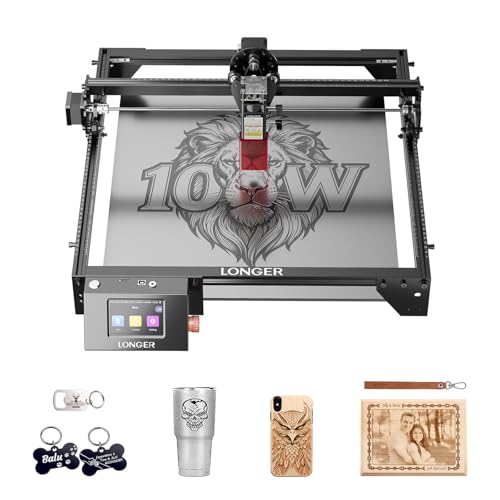
- 400 x 400 mm working area
- Up to 24,000 mm/min engraving speed
- Touchscreen, Wi-Fi, USB, TF card, and app control
Best For: Larger flat projects and workshop-style production
Power-Packed Precision

- 5.5W laser with air-assist support
- 300 x 300mm work area
- LightBurn, LaserGRBL, Wi-Fi, and offline control
Best For: Makers needing detailed engraving and moderate cutting power
Large-Format Production

- 400 x 400mm work area
- 22W cutting and engraving power
- Wi-Fi app, LightBurn, and rotary expansion
Best For: Larger projects, thicker materials, and batch production
Compact Precision Pick

- 0.01 mm engraving accuracy
- Compact 300 × 300 mm work area
- LightBurn and LaserGRBL support
Best For: Portable home crafting and detailed personalized projects
Feature-Rich Upgrade Pick

- Verified 10W output and fast 15,000 mm/min speed
- Offline and wireless control options
- Optional IR head for future expansion
Best For: Small businesses and repeat crafting jobs
Safest All-in-One Pick

- Includes enclosure and honeycomb bed
- Class 1 safety sensors and exhaust fan
- 10W power with 0.01 mm precision
Best For: Beginners wanting a more complete enclosed setup
Most Versatile Enclosed Pick – xTool M2 10W Laser Engraver
For home workshops that handle varied craft projects, the xTool M2 is a flexible choice among laser engravers for home workshops. Its enclosed Class 1 design, dual cameras, and beginner-friendly software support accurate work on wood, leather, felt, fabric, paper, and other materials.
Best For: Home crafters and DIY makers who want an enclosed machine with camera-assisted positioning and room to expand.
Pros:
- Built-in dual cameras support real-time previews and “Place & Go” positioning.
- Class 1 enclosed design includes real-time monitoring for home use.
- Works with more than 300 materials and supports cutting, engraving, and optional add-on capabilities.
- xTool Studio includes templates and an AI image generator for simpler project setup.
Cons:
- The CMYK inkjet module, 3W IR laser, and RA3 Lite Rotary are sold separately.
- The included laser is 10W, so cutting thicker materials may require project-specific settings and passes.
The M2 stands out when convenience, safety, and material flexibility matter more than having every advanced module included. It is a strong foundation for personalized gifts, decor, and small home crafting projects.
Best Compact Production Value – Artilume T1 7W Laser Engraver
The Artilume T1 is a compact option for laser engravers for home workshops, combining a 7W laser with a protective casing, height riser, and smartphone app control. Its small 200 x 150 mm work area suits detailed craft projects and light production runs.
Best For: Makers and small businesses producing detailed ornaments, coasters, gifts, and other compact projects.
Pros:
- Includes the 7W laser, protective cover, height riser module, and APP control in one package.
- Advertised 0.01 mm engraving accuracy suits fine text, logos, photos, and intricate patterns.
- Supports wood, leather, dark acrylic, coated metal, paper, bamboo, and other craft materials.
- Maximum speed is listed at up to 10,000 mm/min for batch-oriented work.
Cons:
- The standard engraving area is relatively compact at 200 x 150 mm.
- Cutting 4 mm basswood can require proper settings and multiple passes.
- Bare metal may require marking spray for engraving.
The included riser and protective casing make this T1 package more adaptable than a basic desktop frame. Choose it when compact dimensions and detailed engraving are priorities, rather than large signs or oversized projects.
Smartest Enclosed Workstation – TOOCAA NOVA 20W Laser Engraver
For shoppers comparing laser engravers for home workshops, the TOOCAA NOVA emphasizes automation and indoor-friendly operation. Its 5MP AI camera, automatic focusing, material recognition, enclosed Class 1 design, and integrated rotary support are aimed at reducing setup and alignment work.
Best For: Beginners, families, and small businesses wanting fast, guided engraving on flat and cylindrical items.
Pros:
- 5MP AI camera provides live previews and one-click calibration for placement.
- 3-second autofocus and AI material recognition reduce manual setup and testing.
- Fully enclosed Class 1 design includes flame detection, emergency stop, lid-open stop, tilt protection, and child lock.
- Built-in 360° rotary kit supports tumblers, bottles, rings, and other cylindrical projects without extra risers.
Cons:
- The machine weighs 33.3 pounds, so it is less convenient to move frequently.
- Its advanced workflow may be more than needed for simple, occasional engraving.
The NOVA is a strong choice when ease of use and safety features are central to the buying decision. Its camera-guided workflow and rotary capability also make it well suited to personalized products and repeatable customization.
Best Large-Format Open-Frame Pick – LONGER Ray5 10W Laser Engraver
The LONGER Ray5 is suited to home workshops that need more room for signs, decor, and larger DIY projects. Its 400 x 400 mm work area, 10W dual-beam laser, touchscreen, and multiple connection methods give it a practical balance of workspace and control.
Best For: Hobbyists, classrooms, workshops, and small businesses working on larger flat projects or multiple machines.
Pros:
- Large 400 x 400 mm working area accommodates signs, decor, gifts, and broad craft layouts.
- Up to 24,000 mm/min speed and a 0.06 x 0.06 mm laser spot support detailed work.
- 3.5-inch touchscreen plus USB, TF card, Wi-Fi, and app connectivity allow flexible operation.
- Compatible with LaserGRBL, LightBurn, and LONGER’s LaserBurn software.
Cons:
- The open-frame format requires careful attention to the supplied safety measures, including protective covers and goggles.
- It does not offer the fully enclosed Class 1 setup described for some competing models.
- The larger work area requires more dedicated workspace.
The Ray5 is the practical pick when project size and connectivity matter most. Its multi-machine control and offline operation also make it appealing for classrooms, maker spaces, and small-scale production environments.
Power-Packed Precision – Twotrees TTS-55 Pro
For home workshops that need a balance of cutting power, detail, and software flexibility, the Twotrees TTS-55 Pro is a capable option among laser engravers for home workshops. Its 300 x 300mm work area, 5.5W laser, and air-assist support suit a range of DIY and maker projects.
Best For: Hobbyists, makers, and small businesses working with wood, leather, acrylic, paper, and coated materials.
Pros:
- 5.5W laser with support for an air-assist system and a metal air-assisted nozzle.
- Fine 0.08 x 0.46mm spot focus and up to 0.1mm engraving accuracy.
- Supports LaserGRBL, LightBurn, Wi-Fi control, TF-card offline engraving, and speeds up to 30,000mm/min.
Cons:
- Its 300 x 300mm work area is smaller than some larger desktop machines.
- The listed cutting capacities are limited to materials such as 5mm plywood, 3mm acrylic, and 0.7mm leather.
The TTS-55 Pro is a well-rounded choice when precision and connected controls matter more than a very large work area. Its included guides and broad software compatibility also make it approachable for newer users.
Large-Format Production – ARTILUME A4-22W
The ARTILUME A4-22W stands out for home workshops that handle larger designs or repeated orders. With a 400 x 400mm work area and 22W diode laser, it is one of the more production-oriented laser engravers for home workshops.
Best For: DIY users, sign makers, and small businesses cutting thicker wood and acrylic or producing personalized items in batches.
Pros:
- Large 400 x 400mm work area supports larger designs without repositioning.
- 22W laser is rated to cut up to 12mm paulownia, 10mm basswood plywood, and 6mm black opaque acrylic in one pass.
- Offers 0.01mm precision, 10,000mm/min speed, Wi-Fi app control, and LightBurn compatibility.
- Can be expanded with optional rotary and air-assist accessories.
Cons:
- Rotary engraving and air assist require optional accessories.
- Its larger work area and stronger laser may be more capability than casual users need.
Choose the ARTILUME when project size, thicker materials, and throughput are priorities. The rigid aluminum frame and multiple control options make it suitable for more demanding craft-room or small-business workflows.
Portable Beginner Pick – LaserPecker LP1 Plus
If portability and simplicity matter most, the LaserPecker LP1 Plus offers a compact alternative to full-size laser engravers for home workshops. It starts in about two minutes, works from a power bank, and uses an adjustable stand for multi-angle engraving on small non-metal projects.
Best For: Beginners and mobile creators personalizing small wood, leather, acrylic, paper, and other compatible non-metal items.
Pros:
- Pocket-sized 2.4-pound design is easy to carry in a backpack.
- Can run from a power bank for use away from a conventional workshop setup.
- Simple cross-platform app supports importing photos and doodles.
- Adjustable stand, magnetic base, and 360-degree multi-angle positioning add flexibility.
Cons:
- Metal engraving is not supported.
- Requires a precise 200mm lens-to-material distance using the included ruler.
- Its compact format is best suited to smaller projects rather than large workpieces.
The LP1 Plus is best viewed as a highly portable entry point rather than a heavy-duty cutter. Its straightforward setup and mobile power support make it appealing for learning, gifting, and on-the-go personalization.
Compact Precision Pick – ELIDOR Z6 6W Laser Engraver
For shoppers comparing laser engravers for home workshops, the ELIDOR Z6 is a compact diode machine focused on detailed engraving and straightforward software compatibility. Its 300 × 300 mm work area and low weight make it practical for desks, classrooms, craft fairs, and small projects.
Best For: Beginners, hobbyists, and makers who prioritize portability, fine detail, and flexible file and software support.
Pros:
- 0.01 mm engraving accuracy and a fine 0.04 × 0.14 mm laser spot.
- Supports wood, leather, acrylic, cardboard, ceramic, glass, and metal.
- Works with LaserGRBL and LightBurn on Windows, macOS, and Linux.
- Compact 11.8 × 11.8-inch work area and 4.7-pound weight.
Cons:
- The 6W module is less powerful than the 10W machines in this roundup.
- The relatively compact work area may limit larger projects.
- The supplied notes do not mention an enclosure or built-in smoke extraction.
The ELIDOR Z6 makes sense when workspace efficiency and engraving detail matter more than maximum cutting power. It is a flexible entry point for personalized gifts, décor, and craft work, provided you are comfortable managing the workspace and materials appropriately.
Feature-Rich Upgrade Pick – K15 Pro 10W Laser Engraver
The K15 Pro is aimed at home workshops that need more speed, cutting capability, and automation without moving to a large machine. It combines a near-A4 work area with wireless app control, offline operation, smart focusing, and a verified 10W diode output.
Best For: Beginners, repeat-job makers, and small businesses producing signs, coasters, tumblers, jewelry blanks, and gifts.
Pros:
- Verified 10.36–10.58W output, with claimed cutting capability for 12 mm plywood and 8 mm acrylic.
- 15,000 mm/min speed, 0.01 mm precision, one-touch focus, and smart memory for repeat jobs.
- Supports CutLabX, LightBurn, and LaserGRBL, with computer, tablet, and phone control.
- Includes a starter kit and supports offline batch jobs from a TF card.
Cons:
- The full accessory ecosystem, including the IR head, rotary roller, and air purifier, may require additional purchases.
- The near-A4 work area is useful for everyday projects but not oversized workpieces.
- Some advanced features may add setup and learning complexity for first-time users.
The K15 Pro stands out for users who want a machine that can grow with a small craft operation. Its offline controls and repeat-job features are particularly useful for batches, while the optional IR head provides an upgrade path for stainless steel tumblers and aluminum.
Safest All-in-One Pick – BlazeX M3 10W Laser Engraver
Among laser engravers for home workshops, the BlazeX M3 is notable for combining a 10W module with an enclosure, honeycomb bed, starter materials, and safety features. It is designed to reduce the amount of extra equipment a beginner needs before starting desktop engraving and cutting projects.
Best For: Beginners and home users who want an enclosed starter setup for detailed engraving, small-batch work, and mixed materials.
Pros:
- 0.01 mm precision and compatibility with more than 300 materials, including wood, leather, glass, and coated metal.
- Includes a protective enclosure, honeycomb bed, 13 engraving materials, goggles, and tools.
- Class 1 safety design includes lid and tilt sensors, a fan, and smoke and odor exhaust.
- Works with LightBurn, LaserGRBL, and CutLabX across Windows, macOS, iOS, and Android.
Cons:
- The supplied notes do not specify the machine’s work-area dimensions or maximum cutting thickness.
- Rotary, air-assist, and purification accessories are optional upgrades.
- An enclosed setup may take more space than a bare-frame engraver.
The BlazeX M3 is a strong starter bundle for shoppers who value convenience and built-in protection. Its included enclosure and honeycomb bed help create a more complete home setup, while the accessory ecosystem leaves room to expand into cylindrical items and cleaner cutting.
How We Picked the Best Laser Engravers for Home Workshops
We compared these machines by looking at the features that matter most in a home setting: laser output, usable work area, enclosure and safety design, camera positioning, software or app support, speed, material compatibility, and ease of setup. We also considered whether each model suits occasional crafting, larger signs and panels, detailed engraving, or more demanding cutting work.
Laser power ratings are useful but not the only measure of performance. Air assistance, focus adjustment, motion accuracy, ventilation, and tested material settings can have just as much impact on finished results.
Quick Comparison
| Best For | What to Look For |
|---|---|
| Beginners and casual crafters | Simple setup, guided software, camera positioning, and reliable safety features |
| Signs and larger projects | A work area around A4 size or larger and stable frame construction |
| Cutting thicker materials | Higher optical power, air assistance, multiple passes, and suitable ventilation |
| Small workspaces | Compact footprint, folding or removable components, and an enclosed design |
| Portable engraving | Low weight, adjustable stands, app controls, and modest material expectations |
Key Buying Factors for Laser Engravers for Home Workshops
Enclosure and Ventilation
A fully enclosed, Class 1-rated design is usually the easiest option for a home workshop because it helps contain laser light and smoke. Even enclosed machines generally need appropriate exhaust or filtration. Open-frame models require more deliberate safety controls, protective eyewear where appropriate, and a controlled operating area.
Power, Focus, and Materials
Higher-powered diode lasers can cut more efficiently, but performance varies by material and thickness. Check the manufacturer’s supported materials and never assume that a laser can safely process PVC, vinyl, unknown plastics, or other materials that may release hazardous fumes. Metal marking may require coated surfaces or specialized settings rather than direct cutting.
Work Area and Positioning
Measure your typical projects before buying. A compact engraver may be ideal for ornaments and small gifts, while a near-A4 or 400×400mm bed is more practical for signs, panels, and batch work. Built-in cameras or live positioning can reduce setup errors and help place designs accurately.
Software and Daily Workflow
Consider whether the machine uses desktop software, a mobile app, or both. Features such as autofocus, material libraries, offline operation, air-assist support, and adjustable risers can make repeated jobs easier. Confirm operating-system compatibility and available file formats before ordering.
Who Should Buy Which Laser Engravers for Home Workshops?
Choose a compact beginner-oriented model if you want straightforward engraving for gifts, labels, and small craft projects. A camera-equipped enclosed machine is a strong fit for users who value easy alignment and a cleaner workflow. For larger artwork or frequent cutting, prioritize the biggest work area and highest practical power within your budget. A portable mini engraver makes sense for light-duty personalization, but it is not a substitute for a full-size workshop cutter.
Whichever model you choose, plan for ventilation, fire prevention, material testing, and supervision. A laser engraver is a powerful workshop tool, and safe operation matters as much as speed or resolution.