Reliable shared storage does not always require a full network-attached storage system. The right direct-attached RAID enclosure can give a small business redundancy, faster local file access, and room to expand while keeping hardware and setup costs under control.
This roundup compares 10 diskless enclosures across dual-, four-, and five-bay designs, including USB-C, USB 3.0, USB 3.1 Gen 2, and rack-mount options. Because these products require separate SATA drives, compatibility, RAID management, cooling, and backup planning all deserve attention before you buy.
Best 10 Raid Enclosures for Small Businesses Picks for 2026
Best QNAP Option

- Four-bay hardware RAID enclosure
- Supports RAID 0, 1, 5, JBOD, and individual disks
- USB-C connectivity for Windows, macOS, and Linux
Best For: Small offices needing direct-attached storage or QNAP NAS backup
Best High-Capacity Choice
MAIWO 4-Bay SATA RAID Enclosure

- Eight listed RAID and storage modes
- Up to 96TB across four drives
- Two switch-controlled cooling fans
Best For: Businesses handling large backups, surveillance data, or media libraries
Best Rack-Mount Design
Sedna 1U Dual-Bay RAID Enclosure

- Fits a standard 19-inch 1U rack
- Supports HDDs and SSDs
- Hardware RAID 0, 1, JBOD, and SPAN
Best For: Rack-based offices needing compact two-drive storage
Best Five-Bay Expansion
TERRAMASTER D5-310 Hardware RAID Enclosure

- Five bays and up to 120TB capacity
- Hardware RAID 5, 0, 1, 10, and Single modes
- Works with Windows, macOS, and Linux
Best For: Teams planning large direct-attached backups and storage expansion
Flexible Four-Bay Expansion

- Eight RAID and storage modes
- Up to 88TB with four 3.5-inch drives
- 150W supply and 80mm cooling fan
Best For: Large office backups and high-capacity file storage
Five-Bay USB-C Storage Hub

- Eight RAID and storage modes
- Up to 160TB across five SATA drives
- USB-C with smart temperature-based cooling
Best For: Expandable office DAS and backup workflows
Compact Two-Drive Backup

- Four RAID and storage modes
- Supports two 2.5-inch SATA drives
- Tool-free design with hot swapping
Best For: Compact mirrored backups and portable office storage
Best with Extra Features

- Four SATA drive bays with up to 80TB capacity
- Eight modes, including RAID 5 and RAID 10
- USB-A/C 3.0 and eSATA connectivity
Best For: Small offices needing high-capacity direct-attached storage
Fast Compact Pick
MAIWO Dual-Bay 2.5-Inch RAID Enclosure
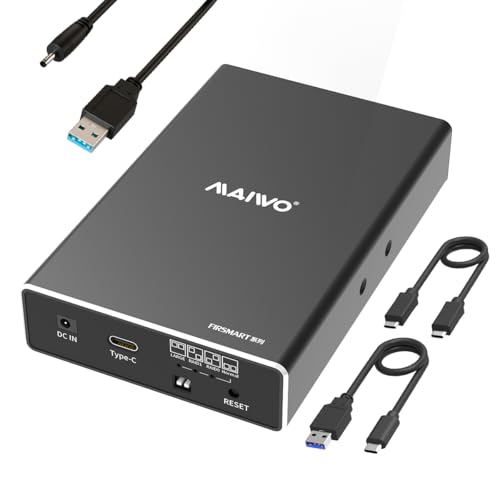
- USB 3.1 Gen 2 supports up to 10Gbps
- Four modes include RAID 1 and JBOD
- Portable, tool-free two-bay design
Best For: Small teams using portable 2.5-inch storage
Balanced Two-Bay Option

- Supports both 2.5- and 3.5-inch SATA drives
- Four modes include RAID 0, RAID 1, and JBOD
- Up to 40TB total capacity with USB-A/C 3.0
Best For: Small offices needing flexible two-drive direct-attached storage
Best QNAP Option – QNAP TR-004 4-Bay USB-C DAS
QNAP TR-004 4 Bay USB Type-C Direct Attached Storage (DAS) with hardware RAID (Diskless)
Check Price On AmazonThe QNAP TR-004 is a practical starting point for small businesses seeking raid enclosures for small businesses without adding another network device. This diskless, four-bay DAS connects over USB Type-C and supports hardware RAID 0, 1, 5, JBOD, and individual-disk modes.
Best For: Small offices that need direct-attached storage, NAS backup, or straightforward capacity expansion across Windows, macOS, and Linux systems.
Pros:
- Hardware RAID supports RAID 0, 1, 5, JBOD, and individual disks
- Works with Windows, macOS, and Linux via USB Type-C
- Lockable bays accommodate four 3.5-inch SATA drives
- Can serve as external storage for QNAP NAS backup
Cons:
- Drives are not included
- Some older QNAP NAS models are unsupported
- Its storage pool cannot be combined with the connected NAS volume
The TR-004 is a balanced choice when a business wants familiar hardware RAID and simple USB connectivity. Its QNAP-specific limitations make compatibility checking important before purchase.
Best High-Capacity Choice – MAIWO 4-Bay SATA RAID Enclosure
The MAIWO 4 Bay RAID Enclosure is designed for businesses that need flexible, high-capacity direct-attached storage. It supports four 3.5-inch SATA drives, USB-A/C 3.1 connectivity up to 5Gbps, and several RAID configurations for different performance and redundancy needs.
Best For: Professional users and small businesses managing large backups, surveillance data, media libraries, or workstation storage.
Pros:
- Offers Normal, RAID 0, 3, 5, 1/10, Clone, and Large/JBOD modes
- Supports up to 96TB with four 24TB drives
- Includes two switch-controlled cooling fans
- USB-A to USB-C and USB-C to USB-C cables are included
Cons:
- Drives are not included
- Its listed warranty and return conditions require careful review
- Transfer speeds are limited to up to 5Gbps
With broad RAID support and substantial capacity, the MAIWO is a versatile option among raid enclosures for small businesses. It is especially appealing where cooling and storage scale matter more than a compact footprint.
Best Rack-Mount Design – Sedna 1U Dual-Bay RAID Enclosure
Sedna - 1U Rack Mount USB 3.1 Gen II (10Gbp) Dual Bay Hard Disk RAID Enclosure
Check Price On AmazonThe Sedna 1U Rack Mount enclosure suits small businesses that prefer storage equipment housed in a standard 19-inch rack. Its dual bays support internal HDDs or SSDs, while hardware RAID 0, 1, JBOD, and SPAN modes provide options for speed, redundancy, or combined capacity.
Best For: Rack-based server rooms and offices needing a compact two-drive enclosure with simple switch-based RAID selection.
Pros:
- Fits a 19-inch, 1U rack-mount setup
- Supports both HDDs and SSDs
- Hardware RAID includes RAID 0, 1, JBOD, and SPAN/BIG modes
- Can reach up to 800MB/s with dual SSDs in RAID 0 mode
Cons:
- Only two internal drives are supported
- The supplied notes do not specify included drives or cable details
- RAID 0 improves speed but does not provide redundancy
The Sedna stands out when rack compatibility is a priority. Its smaller two-bay design is less suitable for capacity-heavy deployments, but it can provide a tidy storage addition for a compact server environment.
Best Five-Bay Expansion – TERRAMASTER D5-310 Hardware RAID Enclosure
The TERRAMASTER D5-310 gives small businesses room to grow with five drive bays and hardware RAID controlled by a dedicated rear-panel knob. It connects through USB 3.1 Gen 1, supports Windows, macOS, and Linux, and provides RAID 5, 0, 1, 10, and individual-disk modes.
Best For: Teams that need up to 120TB of direct-attached storage for backups, shared workstation data, or multi-platform workflows.
Pros:
- Five bays support up to 120TB using five 24TB drives
- Hardware RAID includes RAID 5, 0, 1, 10, and Single modes
- Supports 3.5-inch HDDs, 2.5-inch SATA drives, and SSDs
- Includes Windows backup software and a two-year warranty
Cons:
- Drives are not included
- USB transfer speed is rated up to 5Gbps
- Actual listed read/write speeds are lower than the interface maximum
The D5-310 is a strong expansion-focused pick among raid enclosures for small businesses. Its fifth bay, hot-spare feature, broad operating-system compatibility, and included backup software make it well suited to larger business storage plans.
Flexible Four-Bay Expansion – ORICO 4-Bay RAID Enclosure
For small businesses seeking raid enclosures for small businesses, the ORICO 9848RU3 offers four 3.5-inch SATA bays, eight RAID modes, and up to 88TB of total capacity. Its USB 3.0 connection, aluminum construction, and built-in cooling make it suited to centralized backups and large file storage.
Best For: Small offices managing large backups, video files, or engineering data across multiple 3.5-inch drives.
Pros:
- Eight modes include RAID 0, 1, 3, 5, 10, JBOD, CLONE, and CLEAR.
- Supports up to four 22TB 3.5-inch SATA drives for a stated 88TB maximum.
- 150W power supply and 80mm fan support multi-drive operation and heat removal.
- Trayless bays and independent safety locks simplify drive access while helping prevent accidental ejection.
Cons:
- Uses USB 3.0, with a stated transfer rate of up to 235MB/s, rather than a faster interface.
- Supports 3.5-inch drives only.
The ORICO is a practical high-capacity choice when a business needs several desktop hard drives in one enclosure. Its broad RAID selection adds flexibility, while the aluminum body and active cooling address everyday multi-disk use.
Five-Bay USB-C Storage Hub – UGREEN 5-Bay RAID DAS
The UGREEN 5-Bay DAS is one of the more expandable raid enclosures for small businesses, supporting up to five 2.5- or 3.5-inch SATA HDDs or SSDs. It combines eight RAID and storage modes with USB-C connectivity, smart cooling, and a stated 160TB maximum capacity.
Best For: Growing teams that need flexible external storage for backups, shared file transfer, or mixed-size SATA drives.
Pros:
- Supports PM, RAID 0, 1, 3, 5, 10, Large, and Clone modes.
- Five bays accommodate 2.5- and 3.5-inch drives, up to 32TB per drive and 160TB total.
- USB-C provides up to 5Gbps connectivity and works with Windows, macOS, and Linux.
- Automatic fan adjustment uses S.M.A.R.T. temperatures, with drive and fan sleep after inactivity in PM mode.
Cons:
- Drives cannot be added to or managed as part of a NAS storage pool.
- Changing RAID modes requires reformatting, so data must be backed up first.
UGREEN’s five-bay design gives small businesses room to expand without repeatedly opening a computer. Its USB-C host connection and broad drive compatibility are useful for flexible DAS workflows, provided the NAS limitation and RAID-reconfiguration requirements fit your setup.
Compact Two-Drive Backup – MAIWO Dual-Bay RAID Enclosure
The compact MAIWO dual-bay unit is a straightforward option among raid enclosures for small businesses that use 2.5-inch SATA SSDs or HDDs. It offers RAID 0, RAID 1, LARGE, and NORMAL modes, tool-free setup, and up to 16TB of external storage over USB 3.0.
Best For: Small teams needing portable dual-drive backups, mirrored storage, or a compact way to reuse 2.5-inch SATA drives.
Pros:
- Four modes cover speed, mirroring, combined capacity, and independent drive access.
- Supports two 2.5-inch 7mm or 9.5mm SATA drives, up to 8TB each.
- Tool-free, plug-and-play setup with hot swapping and LED status indicators.
- Compact ABS enclosure measures approximately 5.20 by 3.11 by 1.06 inches.
Cons:
- Limited to two 2.5-inch drives and 16TB total capacity.
- USB 3.0 connectivity is less expandable than the five-bay alternatives.
- Uses high-strength ABS plastic rather than an aluminum enclosure.
MAIWO is best when desk space and simplicity matter more than maximum capacity. Its RAID 1 mode can support a basic mirrored-storage workflow, while the tool-free design keeps routine drive installation uncomplicated.
Best with Extra Features – CENMATE 4-Bay RAID Enclosure
For small businesses comparing raid enclosures for small businesses, this four-bay CENMATE model offers room for up to four 2.5- or 3.5-inch SATA drives and up to 80TB total capacity. USB 3.0 and eSATA provide flexible connectivity, while the aluminum enclosure and built-in fans help with cooling.
Best For: Small offices that need high-capacity direct-attached storage and several RAID layout options.
Pros:
- Supports four 2.5- or 3.5-inch SATA HDDs or SSDs, up to 20TB per drive.
- Offers RAID 0/1/3/5/10, Clone, Large, and Normal modes.
- Includes USB-A/C 3.0 and eSATA connectivity, plus a 12V power adapter.
- Aluminum construction and dual fans support active cooling.
Cons:
- Hot-swapping is not supported.
- Fan noise is rated around 40–50 decibels.
- eSATA access to multiple bays requires a computer port with RAID support; changing RAID modes may cause data loss.
This is the most expandable option in the group, especially for businesses that need multiple drives and broader RAID flexibility. It is still a DAS enclosure rather than a NAS, so it connects directly to a computer.
Fast Compact Pick – MAIWO Dual-Bay 2.5-Inch RAID Enclosure
This compact MAIWO enclosure is a practical option for raid enclosures for small businesses that use 2.5-inch SATA SSDs or HDDs. Its USB 3.1 Gen 2 interface can reach 10Gbps in RAID 0, and the tool-free, portable design keeps deployment simple.
Best For: Small teams that prioritize portability, fast USB transfers, and mirrored or striped 2.5-inch storage.
Pros:
- Supports two 2.5-inch 7mm or 9.5mm SATA HDDs or SSDs.
- USB 3.1 Gen 2 supports transfer speeds up to 10Gbps with RAID 0.
- Provides Normal, RAID 0, RAID 1, and Large/JBOD modes.
- Tool-free installation, hot swapping, and both USB-A and USB-C data cables are included.
Cons:
- Capacity is limited to 16TB total, with up to 8TB per bay.
- Only 2.5-inch drives are supported.
- Drives are not included, and an additional power connection is required.
With its small footprint and faster USB specification, this MAIWO model suits workstations that use 2.5-inch drives. Its lower capacity and two-bay design make it less appropriate for larger storage pools.
Balanced Two-Bay Option – CENMATE 2-Bay RAID Enclosure
For businesses seeking straightforward raid enclosures for small businesses, this two-bay CENMATE model supports both 2.5- and 3.5-inch SATA drives. The ASM1156R chip is designed for stability and compatibility, while USB 3.0, a cooling fan, and four operating modes cover common desktop storage needs.
Best For: Small businesses wanting a flexible two-drive enclosure for backup, mirroring, or expanded direct-attached storage.
Pros:
- Accepts both 2.5- and 3.5-inch SATA HDDs and SSDs.
- Supports RAID 0, RAID 1, Normal, and JBOD modes.
- Handles up to 20TB per drive, or 40TB total.
- Includes USB-A/C 3.0 connectivity, aluminum construction, and a cooling fan.
Cons:
- USB 3.0 transfer rate is listed at up to 5Gbps.
- Fan noise is approximately 40–50 decibels.
- Changing or designing a RAID array may result in data loss; the reset button must be held after resetting the array.
This model strikes a useful middle ground: it has fewer bays than the four-drive CENMATE but accepts larger 3.5-inch drives than the MAIWO. It is a sensible fit for a small office that needs RAID 1 or additional capacity without moving to a NAS.
How We Picked the Best Raid Enclosures for Small Businesses
We focused on enclosures that suit practical small-business storage needs rather than treating drive capacity as the only deciding factor. The shortlist includes dual-bay models for straightforward mirroring, four-bay units for a balance of redundancy and expansion, and five-bay designs for larger media, archive, or project workloads.
We also considered supported RAID modes, drive-format flexibility, connection standards, cooling, tool-free installation, operating-system compatibility, and whether the enclosure is better suited to a desk or server rack. Since all of these products are diskless, buyers should also verify supported drive capacities and purchase matching SATA HDDs or SSDs separately.
Quick Comparison
| Best For | Recommended Bay Count | Useful Features |
|---|---|---|
| Simple mirrored backup | 2 bays | RAID 1, compact footprint, easy drive replacement |
| General office storage | 4 bays | More capacity, multiple RAID modes, active cooling |
| Growing data collections | 5 bays | Higher expansion potential and flexible configurations |
| Server-room deployment | Rack-mount dual bay | 1U installation and centralized cabling |
Key Buying Factors for Raid Enclosures for Small Businesses
RAID Level and Data Protection
RAID 1 mirrors data across two drives and is usually the simplest choice for important documents. RAID 5 can provide usable capacity and single-drive fault tolerance in a compatible four- or five-bay enclosure, while RAID 0 improves speed but offers no redundancy. JBOD and individual-drive modes are useful when you want separate volumes, but neither replaces a backup.
Drive Compatibility and Capacity
Check whether the enclosure accepts 2.5-inch drives, 3.5-inch drives, or both. Large-capacity disks may require current firmware or a specific enclosure limit. Mixing drive sizes can reduce usable capacity, so matched drives are generally easier to manage.
Connectivity and Workflow
USB-C and USB 3.1 Gen 2 can provide higher throughput than older USB connections, although real-world performance depends on the host computer, cable, drives, and RAID level. A direct-attached enclosure is best for one primary workstation or a carefully planned host system; it is not automatically a network share.
Cooling, Noise, and Installation
Fans help protect drives during sustained transfers, but they can add noise in an office. Look for accessible drive bays, tool-free trays where useful, clear status indicators, and a stable power supply. Rack-mount hardware makes more sense when the business already uses a server rack.
Who Should Buy Which Raid Enclosures for Small Businesses?
Choose a dual-bay enclosure if you need affordable mirrored storage for accounting files, client documents, or a workstation backup. A four-bay model is the more versatile choice for most small businesses because it offers greater capacity and more RAID options without becoming difficult to place or manage.
Choose a five-bay enclosure when your business stores large media libraries, design assets, surveillance footage, or growing project archives. For a structured server room, the 1U rack-mount option can keep storage organized. Whichever model you select, pair RAID with an independent backup—preferably one stored offsite or in the cloud—because RAID protects availability, not against accidental deletion, malware, theft, or catastrophic damage.