The best resin printers for schools can produce highly detailed models for STEM lessons, design projects, engineering prototypes, and hands-on demonstrations. The right choice depends on more than resolution: classroom safety, ventilation, workflow simplicity, and ongoing resin costs matter just as much.
We selected ten models spanning compact classroom printers, high-capacity machines, bundled wash-and-cure setups, and faster options for busy makerspaces. Use the guide below to match features and operating requirements to your school’s needs.
Best 10 Resin Printers for Schools Picks for 2026
Best Complete Resin Printing Package
ELEGOO Saturn 4 Ultra 16K With Mercury Plus V3.0

- Includes printer and 7.5L wash-and-cure station
- 16K resolution and 150mm/h printing
- Heated tank supports more consistent printing
Best For: Schools wanting an all-in-one resin printing and post-processing setup
Best for High-Volume Projects

- 18.3L build volume for large batches
- 14-inch 12K screen for fine detail
- Auto-leveling and heated resin tank
Best For: Schools running frequent batch prints or oversized prototypes
Best Smart Classroom Printer

- 16K detail with 14 x 19μm XY resolution
- AI camera enables print monitoring
- Auto-leveling, heating, and self-check features
Best For: Schools seeking guided operation and detailed classroom models
Best for Precision and Process Control
Reflex RS Turbo Resin 3D Printer

- 566:1 contrast amber screen
- One-click slicing repairs models and adds supports
- Sensors provide print protection and diagnostics
Best For: Advanced labs focused on precision, monitoring, and troubleshooting
Large-Format Classroom Production

- Large 298 × 164 × 300mm build volume
- 7K detail with 46μm XY pixel size
- Automated resin management and self-checks
Best For: Schools and labs producing large or batch-printed models
Beginner-Friendly Precision

- 16K resolution with 14 × 19μm pixels
- Factory pre-leveling and smart resin feeding
- Remote monitoring plus built-in resin heating
Best For: Shared classrooms prioritizing ease of use and fine detail
Industrial Lab Durability
F14 Industrial Photocuring Printer
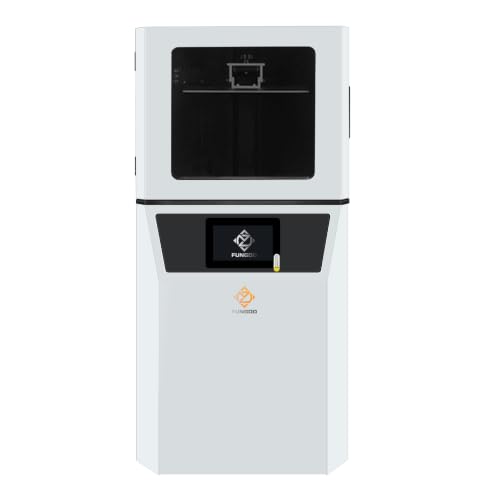
- 0.02mm Z-axis repeatability for stable long prints
- 302 × 162 × 400mm build volume
- Wi-Fi, USB, Linux OS, and CHITUBOX support
Best For: University and enterprise labs running sustained print workloads
Best Dual-Material Pick

- Dual-color and dual-material printing
- Factory-calibrated automatic leveling
- AI monitoring and high-viscosity resin support
Best For: Advanced school labs and multi-material projects
Best Beginner-Friendly Pick

- One-click automatic leveling
- 4K mono LCD for detailed models
- Residue, resin, and overheat protection
Best For: Introductory classrooms and makerspaces
Best for Connected Labs

- Up to 150 mm/h printing speed
- 9K LCD and built-in AI camera
- Wi-Fi cluster printing for multiple printers
Best For: Busy makerspaces and multi-printer school labs
Best Complete Resin Printing Package – ELEGOO Saturn 4 Ultra 16K With Mercury Plus V3.0
ELEGOO Saturn 4 Ultra 16K Resin 3D Printer and ELEGOO Mercury Plus V3.0 Wash and Cure Station
Check Price On AmazonFor schools seeking resin printers for schools, this bundle is a practical choice when post-processing matters as much as print quality. It pairs the Saturn 4 Ultra 16K with a Mercury Plus V3.0 wash and cure station, creating a more complete classroom workflow.
Best For: Schools that want a high-resolution printer and dedicated wash-and-cure equipment in one package.
Pros:
- 16K resin printing with a build area of 8.33 x 4.66 x 8.66 inches.
- Smart tank heating maintains the resin at 30°C.
- Print speeds reach up to 150mm/h.
- Included Mercury Plus V3.0 has a 7.5-liter capacity and supports multiple printer types.
Cons:
- The build volume may limit especially large classroom projects.
- The bundle requires space for both the printer and wash-and-cure station.
This package stands out for classrooms that want fewer compatibility decisions and a streamlined path from printing to post-processing. Its heated resin tank and high resolution also support more consistent, detailed results.
Best for High-Volume Projects – ANYCUBIC Photon P1 Max
Among resin printers for schools, the ANYCUBIC Photon P1 Max is designed for classrooms or labs that need substantial capacity. Its 18.3-liter build volume can accommodate oversized prototypes or densely packed batches in one print cycle.
Best For: Schools with dedicated workshop space and frequent large or multi-part production needs.
Pros:
- Large 285.5 x 214 x 300mm build volume supports batch printing and oversized models.
- 14-inch 12K monochrome screen produces fine detail.
- Heated 1900ml resin tank maintains temperatures up to 35°C.
- Auto-Leveling 3.0 simplifies setup and calibration.
Cons:
- Its 68.9-pound weight and large dimensions require substantial space and a sturdy location.
- The larger resin capacity may be more than occasional classroom users need.
The P1 Max is a capacity-focused option rather than a compact desktop printer. Auto-leveling and temperature control can reduce setup variables, while its large build area makes it well suited to shared production environments.
Best Smart Classroom Printer – ELEGOO Saturn 4 Ultra 16K
The ELEGOO Saturn 4 Ultra 16K is a strong candidate among resin printers for schools because it combines detailed output with automated checks. Its camera, heated resin tank, automatic leveling, and monitoring system can make supervised classroom printing easier.
Best For: Schools that prioritize detailed models, remote monitoring, and simplified operation.
Pros:
- 16K LCD provides 14 x 19μm XY resolution for intricate models.
- Automatic heating activates when resin temperature falls below 25°C.
- AI camera supports print monitoring and time-lapse recording.
- Automatic leveling, Wi-Fi transfer, power-on resume, and startup self-checks support easier use.
Cons:
- The 8.33 x 4.66 x 8.66-inch print area is not intended for very large models.
- Its advanced monitoring features may be more than basic users require.
For an instructional lab, the Saturn 4 Ultra 16K offers useful visibility into the print process and several safeguards against common interruptions. It is a particularly sensible fit where staff or students need a guided, repeatable workflow.
Best for Precision and Process Control – Reflex RS Turbo Resin 3D Printer
For schools evaluating resin printers for schools around precision and repeatability, the Reflex RS Turbo emphasizes monitoring and automated print preparation. Its high-contrast amber screen, one-click slicing, and force-sensing protection are aimed at reducing setup and print-failure variables.
Best For: Advanced school labs teaching precise model preparation, process control, and resin printing diagnostics.
Pros:
- Amber screen has a stated 566:1 contrast ratio for sharp detail and dimensional accuracy.
- One-click slicing can repair model defects and generate supports.
- Floating Screen Auto-Leveling corrects deviations up to 0.15°.
- Force sensors can detect residue, pause prints, and generate diagnostic reports.
Cons:
- The feature-rich system may present a steeper learning curve for beginners.
- At 50.6 pounds, it is not especially easy to move between classrooms.
The Reflex RS Turbo is best viewed as a process-focused machine for programs that value precision and troubleshooting data. Its automated preparation and real-time protection may help instructors manage more demanding workflows, provided the school has space and technical oversight.
Large-Format Classroom Production – Photon Mono M7 MAX
For schools seeking resin printers for schools that can handle larger models and batch projects, the ANYCUBIC Photon Mono M7 MAX combines a spacious build area with detailed 7K output. Its automated resin handling and self-check features may also help reduce routine operating errors.
Best For: Schools, labs, and makerspaces producing large or multiple detailed models.
Pros:
- Large 298 × 164 × 300mm build volume supports oversized and batch prints.
- 7K resolution with 46 × 46μm XY pixel size produces detailed models.
- Automatic resin management, temperature-controlled vat, and five intelligent inspections streamline operation.
- Print speeds reach up to 60mm/h, according to the supplied specifications.
Cons:
- Its 60.9-pound weight and large footprint require substantial dedicated space.
- The large resin capacity and industrial-leaning feature set may be more than small classes need.
The M7 MAX is a strong choice when a school values throughput and build size as much as resolution. Its automation can support a smoother lab workflow, though administrators should plan for the printer’s considerable size and weight.
Beginner-Friendly Precision – UniFormation GK3T
The UniFormation GK3T is a practical option among resin printers for schools when ease of use and fine detail are priorities. Factory pre-leveling, smart resin feeding, heating, and remote monitoring are designed to simplify daily printing for shared classroom or lab use.
Best For: Schools and instructional labs that want high-resolution output with a guided workflow.
Pros:
- 16K resolution and 14 × 19μm pixel size support highly detailed, smooth models.
- Factory pre-leveling and smart resin feeding help simplify setup and operation.
- Built-in heating is designed to maintain resin fluidity in temperatures as low as 0°C/32°F.
- App and slicing-software support enables remote control, progress monitoring, and timelapse recording.
Cons:
- The 52.8-pound printer still needs a stable, dedicated workspace.
- The supplied notes do not specify its build volume or maximum print speed.
With its emphasis on guided operation and remote oversight, the GK3T can fit classrooms where several users share one printer. Its 16K output is especially appealing for detailed educational models, miniatures, and prototypes.
Industrial Lab Durability – F14 Industrial Photocuring Printer
For universities and enterprise-style school labs comparing resin printers for schools, the F14 focuses on stability during extended operation. Its reinforced Z-axis, large build volume, dual connectivity, and Linux-based workflow are aimed at professional, continuous-use environments.
Best For: University labs, technical programs, and schools needing stable long-duration or batch printing.
Pros:
- Ball screw, linear guide, and dual-slider Z-axis design provide 0.02mm repeatability.
- 302 × 162 × 400mm build volume supports tall models and efficient batch production.
- Adjustable 0.01–0.15mm layer thickness enables fine-detail control.
- Wi-Fi and USB connectivity, Linux OS, and CHITUBOX compatibility support flexible task management.
Cons:
- At 68 pounds and 25.6 inches tall, it demands substantial installation space.
- Its industrial-grade design may be excessive for introductory classroom projects.
- The supplied notes identify the LCD as 6K rather than a higher-resolution option.
The F14 is best suited to institutions treating resin printing as a production or engineering-lab capability. Its mechanical stability and tall build area are compelling for sustained use, provided the school can accommodate its size and professional workflow.
Best Dual-Material Pick – Photon P1
For schools seeking resin printers for schools that support more experimental classroom projects, the ANYCUBIC Photon P1 stands out with dual-color and dual-material printing. Its factory-calibrated leveling, release-assistance technology, and automated monitoring are designed to simplify operation and improve print reliability.
Best For: Schools teaching design, prototyping, and advanced 3D-printing workflows that can benefit from two colors or materials in one print.
Pros:
- Dual-color and dual-material printing expands creative project options.
- Factory-calibrated automatic leveling reduces setup work.
- AI monitoring checks plate installation, resin level, residue, and layer separation.
- Supports high-viscosity resins up to 8,000 cps.
Cons:
- At 39 pounds, it is relatively heavy to move between classrooms.
- Its advanced features may be more than needed for introductory projects.
The Photon P1 is a feature-rich choice for schools with ambitious resin-printing programs. Wave Release Technology and automated checks may help reduce failed prints, while dual-material capability adds flexibility for demonstrations and student prototypes.
Best Beginner-Friendly Pick – ELEGOO Mars 5
The ELEGOO Mars 5 is a practical option for schools introducing resin printers for schools to students and teachers. One-click automatic leveling, self-check functions, and built-in safety alerts reduce the amount of routine setup and troubleshooting required before printing.
Best For: Classrooms and makerspaces that prioritize straightforward operation, detailed prints, and accessible maintenance.
Pros:
- One-click automatic leveling helps simplify setup for different skill levels.
- Residue detection and resin-shortage alerts can help prevent interruptions and damage.
- 4K mono LCD and COB light source support detailed models.
- Overheat protection stops printing and sounds an alarm above 80°C LED temperature.
Cons:
- The supplied specifications do not mention Wi-Fi or multi-printer control.
- Its feature set is focused on standard resin printing rather than dual-material work.
For schools that want a manageable entry point, the Mars 5 combines simplified leveling with useful pre-print checks and safety protection. Its 4K display is well suited to detailed classroom models without adding the more specialized capabilities of larger systems.
Best for Connected Labs – Mars 5 Ultra
The ELEGOO Mars 5 Ultra is built for schools that need speed, detailed output, and easier oversight across a busy lab. It combines high-speed printing with a 9K LCD, AI camera monitoring, automatic leveling, and Wi-Fi cluster printing for remote file transfer and control.
Best For: High-volume school makerspaces and programs managing multiple printers or more complex student projects.
Pros:
- Print speeds reach up to 150 mm/h with tilt release technology.
- 9K mono LCD supports sharp, complex models.
- AI camera detects issues such as empty build plates and model warping.
- Wi-Fi cluster printing supports simultaneous operation of multiple printers.
Cons:
- Its advanced networking and monitoring features may be unnecessary for a small classroom.
- The 9K screen, AI camera, and cluster controls may require more staff training.
The Mars 5 Ultra is the strongest fit here for a coordinated school lab. Its combination of fast printing, remote management, and real-time monitoring can help instructors oversee multiple machines while maintaining detailed output.
How We Picked the Best Resin Printers for Schools
We compared these printers by looking at the factors that affect real classroom use: print resolution, build volume, leveling and calibration, operating speed, software and connectivity, cleaning workflow, replacement-part availability, and overall value. We also considered whether each printer is better suited to a supervised classroom, a dedicated makerspace, or an enterprise-style lab.
Resin printing requires more supervision than filament printing. Uncured resin, solvents, gloves, spills, fumes, and UV exposure should be managed under your school’s safety procedures. A printer with automatic leveling or a bundled wash-and-cure station may reduce setup time, but it does not replace ventilation, personal protective equipment, or trained supervision.
Quick Comparison
| Priority | What to look for | Best fit |
|---|---|---|
| Easy classroom setup | Automatic leveling, guided controls, dependable software | Teachers and first-time student users |
| High detail | High-resolution monochrome LCD and accurate Z-axis movement | Miniatures, models, and technical demonstrations |
| Larger projects | Generous build volume and stable platform | Makerspaces and group projects |
| Faster production | High-speed exposure profiles and reliable automation | Labs with frequent print cycles |
| Complete workflow | Compatible wash-and-cure equipment and accessible consumables | Schools building a full resin-printing station |
Key Buying Factors for Resin Printers for Schools
Safety and Workspace Requirements
Plan the workspace before buying. Resin printers should operate in a controlled, well-ventilated area away from food and unsupervised access. Budget for nitrile gloves, eye protection, spill supplies, wash solvent, curing equipment, and sealed containers for resin waste. Some schools may prefer low-odor or specialty resins, but every material still requires its own safety review.
Ease of Use and Maintenance
Automatic leveling, resin-vat monitoring, Wi-Fi or network controls, and clear exposure settings can reduce teacher workload. Also check how easily the film, build plate, screen protector, and other wear parts can be replaced. A printer that is slightly less advanced but easier to maintain may deliver better classroom uptime.
Resolution, Speed, and Build Volume
Higher LCD resolution can improve fine detail, while larger vats allow more parts per batch. However, bigger machines consume more resin and may require more space and stronger workflow controls. Compare advertised speed with the actual resin profiles and layer heights your projects will use.
Total Cost of Ownership
Include the printer, wash-and-cure equipment, resin, solvent, protective supplies, replacement films, failed-print waste, and staff training. A lower initial price is less attractive if replacement parts are difficult to source or students cannot use the machine without extensive intervention.
Who Should Buy Which Resin Printers for Schools?
Choose a compact, straightforward model for a teacher-led classroom with limited space and occasional projects. A higher-resolution printer is appropriate for art, product design, miniatures, and lessons where surface detail is important. Schools running a busy makerspace should prioritize larger build volume, faster workflows, reliable networking, and readily available spare parts.
Consider a bundled printer and wash-and-cure setup if your school is building its first complete resin-printing workflow. For advanced labs or enterprise-style programs, industrial-oriented machines may make sense when throughput, consistency, and support are more important than the lowest purchase price. Regardless of model, provide student training, establish written cleanup procedures, and assign an adult to oversee resin handling and post-processing.