USB duplicators can copy multiple flash drives at once without tying up a computer, making them useful for IT teams, installers, educators, and media distributors.
This roundup compares 10 standalone and computer-connected options, including compact units, touchscreen models, high-port systems, and a dual-bay hard-drive duplicator.
Best 10 USB Duplicators Picks for 2026
Best Compact Pick

- Copies up to four USB drives at once
- Standalone and portable design
- Supports USB 1.0/2.0/3.0 and drives above 2TB
Best For: Portable four-drive duplication
Best High-Volume Pick

- Copies to up to 15 USB drives
- Supports synchronous and asynchronous modes
- Standalone bit-by-bit duplication
Best For: High-volume business duplication
Best Multi-Function Pick
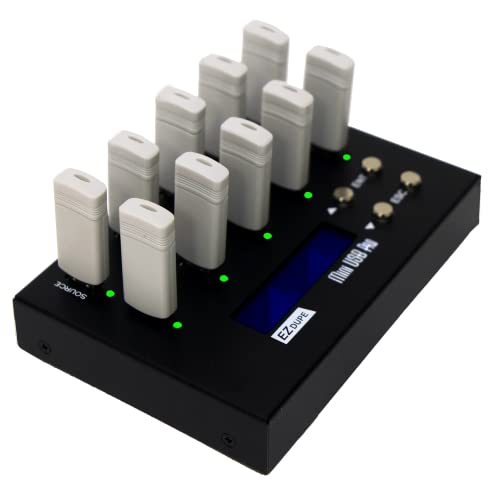
- Copies up to nine USB drives
- Offers quick and sector-by-sector modes
- Includes two erase functions
Best For: Duplication and USB data sanitizing
Best Small-Batch Pick

- Duplicates one drive to two targets
- Includes testing and erase functions
- Portable LCD-controlled operation
Best For: Small-batch USB duplication and media checks
Best Touchscreen USB Duplicator

- Touchscreen controls for copy, compare, format, and erase
- Supports USB 2.0, 3.0, and 3.1 flash media
- Duplicates at up to 35 MB per second
Best For: Routine USB flash-media duplication with simple hands-on controls
Best SATA Drive Dock USB Duplicator
StarTech.com Dual-Bay SATA Cloner

- Standalone cloning for 2.5- and 3.5-inch SATA drives
- USB 3.0 and eSATA host connections
- Copies entire drives at up to 22 GB per minute
Best For: IT cloning, drive access, and recovery tasks
Best Compact Professional USB Duplicator
Vinpower Flash Memory USB Duplicator 1 to 3

- Standalone duplication with three USB target ports
- Smart Copy and Raw Copy modes
- DoD-compliant erasing and Read Error Skip
Best For: Business USB deployment, secure erasure, and media reuse
Best Computer-Connected USB Duplicator

- Copies up to 10 USB drives simultaneously
- Works with Windows and Mac software
- Accepts images, drives, files, and folders
Best For: Computer-controlled batch duplication
Best Compact Standalone USB Duplicator
StarTech 1:5 Standalone Duplicator

- Duplicates or erases five USB drives
- Operates without a computer
- Includes verification and overwrite modes
Best For: Technicians handling small USB batches
Best Higher-Capacity Standalone USB Duplicator
StarTech 1:7 Standalone Duplicator

- Copies or erases seven USB drives
- Works without a computer
- Supports verification and overwrite modes
Best For: IT deployment and USB sanitation batches
Best Compact Pick – EZ Dupe Mini USB Plus MK II
The EZ Dupe Mini USB Plus MK II is a practical choice for buyers who need compact usb duplicators without a computer. It copies up to four USB drives simultaneously, supports USB 1.0, 2.0, and 3.0 media, and offers asynchronous copying for more flexible workflows.
Best For: Portable duplication of several USB flash drives at once, including field and small-office use.
Pros:
- Copies up to four USB drives simultaneously.
- Standalone operation requires no computer or software.
- Updated version supports drives above 2TB and improved compatibility.
- Supports asynchronous copying and power-bank operation.
Cons:
- External USB devices need their own power source.
- Actual speed depends on the connected drives.
With a stated maximum speed of 2.5GB per minute and a compact 12.8-ounce design, this model balances portability and throughput. It is especially appealing when four target drives are enough and a simple plug-and-use workflow matters.
Best High-Volume Pick – Systor 1-to-15 USB Duplicator
The Systor SYS-USBD-15 is built for buyers who need usb duplicators with a larger target capacity. Its 1-to-15 configuration can copy to fifteen USB drives simultaneously, while standalone operation keeps the process independent of a computer or software.
Best For: Businesses, production workflows, and organizations duplicating many USB drives in each batch.
Pros:
- Supports up to fifteen target USB drives.
- Offers synchronous and asynchronous copy modes.
- Performs bit-by-bit duplication for detailed copying.
- Includes lifetime technical support and a three-year labor warranty.
Cons:
- USB Type-C drives require an adapter.
- Its larger 15-drive capacity may be more than occasional users need.
The stated transfer rate reaches 2GB per minute, and the notes indicate that speed remains the same as the number of loaded drives increases. That makes this Systor a strong fit for repeat, high-volume duplication rather than light personal use.
Best Multi-Function Pick – EZ Dupe MiniUSB Pro 1-to-9
The EZ Dupe MiniUSB Pro combines nine-target copying with data-erasure functions, making it one of the more versatile usb duplicators in this group. It supports quick copying for essential files and whole-media, sector-by-sector copying for a more complete clone.
Best For: Users who need both multi-drive duplication and basic USB data-sanitizing functions.
Pros:
- Copies up to nine USB drives simultaneously.
- Provides quick-copy and whole-media copy modes.
- Includes two erase functions for data sanitizing.
- Supports USB 1.0, 2.0, and 3.0 media.
Cons:
- External USB hard drives need their own power source.
- External USB hard-drive support is listed up to 2TB.
- Specified copy speed is lower than the compact MK II model.
With a stated speed of 2GB per minute and a nine-drive target capacity, the MiniUSB Pro sits between compact four-port units and larger 15-port systems. Its erase modes add useful flexibility for organizations preparing or retiring USB media.
Best Small-Batch Pick – BestDuplicator UB300 1-to-2
The BestDuplicator UB300 is a compact option for buyers who need usb duplicators for small batches. It duplicates one USB flash drive to two targets without a computer and adds media testing, verification, and erase tools through a simple LCD interface.
Best For: IT technicians, schools, and small offices that usually need one-to-two USB duplication.
Pros:
- Duplicates one source drive to two targets simultaneously.
- Supports quick copy and bit-for-bit whole-media cloning.
- Includes capacity, device-information, speed-test, and erase functions.
- Portable design has an LCD and individual LED indicators.
Cons:
- Designed for USB 1.1 and USB 2.0 media rather than newer USB standards.
- Memory-card duplication requires a compatible USB card reader sold separately.
- Only supports two target drives at a time.
The UB300 favors control and portability over batch size. Its testing tools can help verify media before deployment, while the two copy modes let users choose between copying data only and cloning the entire source.
Best Touchscreen USB Duplicator – EZ Dupe SOHO Touch 1 to 10
If you want USB duplicators that are straightforward to operate, the EZ Dupe SOHO Touch combines a touchscreen interface with support for USB 2.0, 3.0, and 3.1 flash media. Its standalone controls cover copying, comparison, formatting, and erasing without requiring a computer.
Best For: Daily USB flash-drive duplication where simple touchscreen controls and multi-function media management are priorities.
Pros:
- Touchscreen menu simplifies copying, comparing, formatting, and erasing.
- Supports all file formats, file sizes, and USB flash-drive capacities.
- Duplicates USB flash media at up to 35 MB per second.
- Designed with a lightweight yet durable build for regular operation.
Cons:
- Designed for USB flash media rather than SATA hard-drive cloning.
- The 1-to-10 configuration may be more capacity than occasional users need.
The SOHO Touch is a practical choice for users who value an accessible interface and flexible USB-media functions. Its touchscreen and one-touch erase feature make recurring duplication tasks easier to manage.
Best SATA Drive Dock USB Duplicator – StarTech.com Dual-Bay SATA Cloner
Among USB duplicators for full SATA drives, the StarTech.com SDOCK2U33RE offers standalone sector-by-sector cloning for 2.5- and 3.5-inch SATA HDDs and SSDs. It also works as a USB or eSATA docking station for accessing drives without installing them in a computer.
Best For: IT professionals and technicians who need to clone, dock, or recover SATA HDDs and SSDs.
Pros:
- Clones SATA drives without a PC and supports SATA I, II, and III.
- Handles both 2.5-inch and 3.5-inch HDDs and SSDs of any capacity.
- Copies entire drives, including empty sectors, at up to 22 GB per minute.
- Provides USB 3.0 and eSATA connectivity for drive access.
Cons:
- Target drive must be equal to or larger than the source drive.
- IDE drives require a separately sold adapter.
- Its SATA-focused design is not intended for USB thumb-drive duplication.
This dock is better suited to computer maintenance than flash-drive production. Its dual-bay, tool-free design and sector-by-sector copying make it a capable option for drive cloning and recovery workflows.
Best Compact Professional USB Duplicator – Vinpower Flash Memory USB Duplicator 1 to 3
For organizations that need USB duplicators without connecting to a computer, the Vinpower Flash Memory USB Duplicator provides three standalone target ports. Smart Copy speeds up file-based duplication, while Raw Copy supports complete bit-by-bit cloning of bootable media, software, and backups.
Best For: Businesses, schools, offices, and agencies that regularly duplicate or securely erase USB drives.
Pros:
- Standalone operation avoids the need for a PC during duplication.
- Smart Copy and Raw Copy support both accessible files and complete cloning.
- DoD 5220.22-M erasing helps prepare drives for reuse or disposal.
- Read Error Skip can bypass damaged sectors during duplication.
Cons:
- Offers three USB target ports, fewer than larger multi-drive duplicators.
- Its specialized features may be unnecessary for occasional personal use.
The Vinpower model stands out for business-oriented workflows that combine duplication with secure erasure. Its compact design and error-skipping capability add useful flexibility when handling large batches or aging USB media.
Best Computer-Connected USB Duplicator – DupliM Mini 1-to-10
If you need USB duplicators for a computer-based workflow, the DupliM Mini can copy up to 10 USB 3.0 or 2.0 flash drives simultaneously. It connects to a Windows or Mac computer and works with image files, flash drives, or selected files and folders.
Best For: Home offices, small businesses, and IT users who want high-capacity USB duplication controlled from a Windows or Mac computer.
Pros:
- Duplicates up to 10 USB drives at once.
- Supports USB 3.0 and USB 2.0 media.
- Can copy from image files, flash drives, or selected computer files and folders.
- Includes DupliM software, a power adapter, and a USB 3.0 cable.
Cons:
- Requires a connected Windows or Mac computer.
- Compatibility depends on the listed operating-system and hardware requirements.
The DupliM Mini is a flexible choice when you need to manage many USB copies at once but prefer software-guided operation over a standalone appliance. Its 10-drive capacity is the main advantage for larger batches.
Best Compact Standalone USB Duplicator – StarTech 1:5 Standalone Duplicator
Among USB duplicators, the StarTech 1:5 stands out for standalone operation: it duplicates or erases up to five USB drives without a computer. Its LCD menu, copy-and-compare verification, and multiple erase modes make it practical for technicians and IT professionals.
Best For: IT teams and technicians who need to clone, verify, or securely erase up to five USB drives without using a computer.
Pros:
- Copies or erases up to five USB drives simultaneously.
- Supports system/file copying and sector-by-sector copying.
- Offers quick erase and single- or three-pass overwrite modes.
- Includes LCD controls, error scanning, and copy-and-compare verification.
Cons:
- Asynchronous copying is limited to source content under 64 MB.
- External USB devices may require their own power source.
- It has a lower five-drive capacity than larger duplicators.
This model is a strong fit when standalone convenience and drive sanitation matter as much as duplication. The LCD controls and verification features add useful oversight for routine technical workflows.
Best Higher-Capacity Standalone USB Duplicator – StarTech 1:7 Standalone Duplicator
The StarTech 1:7 is a standalone option for USB duplicators, letting technicians copy or erase up to seven USB drives without a computer. It supports file, system, and sector-by-sector copying, while its LCD interface provides access to verification and drive-monitoring tools.
Best For: IT professionals and support teams that need standalone duplication, erasing, and verification for batches of up to seven USB drives.
Pros:
- Duplicates or erases up to seven USB drives at once.
- Supports FAT16/32, NTFS, Linux ext2, ext3, and ext4 system/file copying.
- Provides sector-by-sector copying for all file formats.
- Includes copy-and-compare verification, error scanning, and three-pass overwrite.
Cons:
- Asynchronous copying is limited to source content under 128 MB.
- External USB devices may need a separate power source.
- Its standalone form weighs 2.3 pounds and is larger than a computer-connected compact unit.
Choose this model over a five-port unit when the extra two target ports can improve your workflow. Its standalone design and security-oriented erase options make it particularly useful for repeatable IT and deployment tasks.
How We Picked the Best USB Duplicators
We focused on the features that have the greatest effect on real-world copying: the number of target ports, supported USB generations, stated transfer speed, standalone operation, erasing functions, source compatibility, and ease of use. We also included both compact duplicators for occasional jobs and higher-capacity systems for repeated production runs.
Product names can describe maximum port counts or supported media rather than guaranteed throughput. Before buying, verify the manufacturer’s specifications for drive capacity, file-system support, copy modes, and whether all ports can operate simultaneously at the advertised speed.
Quick Comparison
| Best For | What to Prioritize |
|---|---|
| Occasional home or office copying | Compact design, simple controls, and standalone operation |
| Small-batch deployment | Four to seven target ports and reliable asynchronous copying |
| Large production runs | Ten or more ports, status monitoring, and higher sustained throughput |
| Secure media reuse | Verified erase or sanitization modes |
| Hard-drive and SSD cloning | Dedicated SATA bays and support for 2.5- and 3.5-inch drives |
Key Buying Factors for USB Duplicators
Port Count and Workflow
A 1-to-3 or 1-to-4 model is often sufficient for occasional batches, while a 1-to-10 or 1-to-15 unit can substantially reduce labor when preparing many drives. More ports are useful only if your source media, destination drives, and workflow can keep up.
Copy Speed and USB Compatibility
Check whether the unit supports USB 2.0, USB 3.0, or USB 3.1 media and whether the quoted speed applies to every active target. Large files generally expose speed limits more clearly than small document sets. Mixed-generation drives may also run at the speed of the slowest connection.
Standalone Controls and Verification
Standalone systems are convenient because they do not require a host computer. LCDs or touchscreens can make port status and job selection easier to manage. For important deployments, look for copy verification, error reporting, and clear indications when a drive is ready to remove.
Erasing, Compatibility, and Security
If drives will be reused, choose a model with an erase or sanitizer function that matches your organization’s requirements. Confirm supported capacities and file systems, and avoid assuming that a basic erase provides the same protection as a documented secure-wipe process.
Who Should Buy Which USB Duplicators?
Choose a compact standalone unit if portability and occasional copying matter most. Select a mid-range multi-port model for IT support, classrooms, repair shops, or small media batches. High-port duplicators make more sense for retailers, event teams, software deployment, and other repeat operations where labor savings justify the larger footprint.
If your work involves internal SATA hard drives or SSDs rather than USB flash media, use a dedicated drive duplicator instead of a flash-focused model. Finally, prioritize touchscreen navigation, LCD feedback, or computer connectivity when multiple operators will use the equipment or when each job needs closer supervision.