Sending one HDMI source to multiple displays is simple in theory, but reliable results depend on bandwidth, HDCP compatibility, EDID handling, cable length, and the number of outputs you need. The right distribution amplifier can keep every screen stable without forcing you to compromise on resolution or audio.
This roundup compares 10 video distribution amplifiers with HDMI, including compact 1×2 models, high-output 1×8 and 1×16 units, and extender-based systems for longer cable runs. Use the guide below to narrow your choice by performance, installation requirements, and budget.
Best 10 Video Distribution Amplifiers with Hdmi Picks for 2026
Compact 4K Splitter
Monoprice Blackbird 1x2 HDMI Amplifier

- One HDMI input feeds two displays
- Supports 4K/30Hz, 3D, and 48-bit Deep Color
- Includes HDCP 1.4 and broad audio support
Best For: Two-display home entertainment setups
EDID-Focused 1x4 Distribution
AC-DA14-AUHD-GEN2 18Gbps Amplifier

- Distributes one HDMI source to four outputs
- Rated for 18Gbps bandwidth
- Includes advanced EDID management
Best For: Four-display installations needing compatibility management
Managed 2x8 Distribution
Digitalinx DL-HD28A-H2 HDMI Amp

- Two inputs distribute to eight outputs
- Supports 4K/60Hz 4:4:4 and HDCP 2.2
- Adds downscaling, audio extraction, and network control
Best For: Large coordinated multi-display systems
Flexible 4K Output Scaling

- Feeds four outputs with 18Gbps 4K video
- Supports 4K/60Hz 4:4:4, HDR, and HDCP 2.2
- Scales outputs independently and extracts audio
Best For: Mixed-resolution four-display systems
Best Long-Range Setup
J-Tech Digital 1x4 HDMI Extender Splitter

- Distributes 1080p to four remote displays
- Reaches up to 164 feet over CAT5e/6
- Includes PoC, loop-out, IR, and EDID features
Best For: Mirrored 1080p distribution across multiple rooms
Best for 4K Home Theater
KanexPro 1x8 HDMI Distribution Amplifier

- Distributes one source to eight displays
- Supports 4K UHD and 1080p at 60Hz
- Handles HDCP 2.2 and major surround formats
Best For: Direct HDMI distribution in 4K media installations
Best for Large CAT-Cable Installations

- Sends one source to eight remote displays
- Reaches 165 feet in 4K and 230 feet in 1080p
- Includes PoLAN, loop-out, IR, and EDID management
Best For: Large meeting-room and commercial CAT-cable deployments
Rack-Ready 16-Output Choice
1:16 HDMI Distribution Amplifier

- 16-channel distribution
- Includes rack ears
- Remote-access switching
Best For: Large rack-based HDMI AV installations
Compact 4K Distribution Pick
C2G 4-Port HDMI Distribution Amplifier
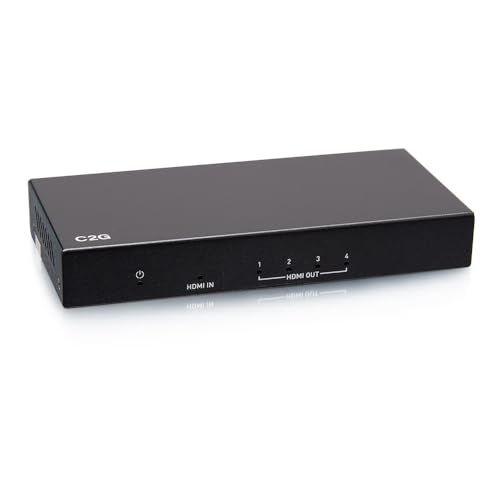
- Supports 4096 x 2160
- Four HDMI ports
- Three-year warranty
Best For: Small systems needing 4K HDMI distribution
Next-Gen 8K Splitter
1x2 HDMI 2.1b Distribution Amplifier
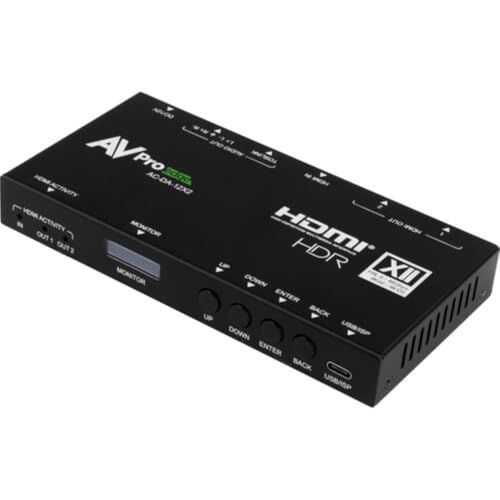
- Supports up to 8K60
- 48 Gb/s bandwidth
- Extended EDID management
Best For: High-bandwidth two-display HDMI 2.1b systems
Compact 4K Splitter – Monoprice Blackbird 1×2 HDMI Amplifier
Monoprice Blackbird 4K 1x2 HDMI Amplifier Splitter - 48-bit Deep Color, 3D Video Support, Black
Check Price On AmazonThe Monoprice Blackbird is a straightforward option for buyers comparing video distribution amplifiers with HDMI for a small setup. Its single HDMI input sends the same source to two HDMI displays, while support for 4K at 30Hz, 3D video, and several digital audio formats covers common home entertainment needs.
Best For: Home theaters or media setups that need one HDMI source distributed to two displays.
Pros:
- Splits one HDMI input to two HDMI sink devices.
- Supports resolutions up to 4K at 30Hz and 1080p at 120Hz.
- Includes HDCP 1.4 compliance, 3D support, and 48-bit Deep Color.
- Supports formats including DTS-HD, Dolby TrueHD, and 7.1-channel LPCM.
Cons:
- Limited to two HDMI outputs.
- 4K support is specified up to 30Hz rather than 60Hz.
- Uses HDCP 1.4 rather than newer HDCP standards.
This is a compact, focused splitter rather than a high-capacity distribution system. It makes the most sense when two displays are enough and the source and displays fit within its 4K/30Hz and HDCP 1.4 specifications.
EDID-Focused 1×4 Distribution – AC-DA14-AUHD-GEN2 18Gbps Amplifier
AVPro Edge AC-DA14-AUHD-GEN2 1x4 18Gbps AUHD Distribution Amplifier with Advanced EDID Management
Check Price On AmazonThe AC-DA14-AUHD-GEN2 is a 1×4 distribution amplifier for sending one HDMI source to four outputs. Its 18Gbps specification and advanced EDID management make it a candidate for installations where display compatibility and coordinated signal distribution matter.
Best For: Installations that need one HDMI source distributed across four displays with EDID management.
Pros:
- Provides one HDMI input and four HDMI outputs.
- Offers 18Gbps bandwidth for compatible high-bandwidth HDMI signals.
- Includes advanced EDID management for display-compatibility handling.
Cons:
- The supplied notes do not specify supported resolutions or refresh rates.
- The supplied notes do not identify audio, HDCP, or scaling features.
Its four-output layout and EDID emphasis give it a practical role in multi-display HDMI installations. Because detailed video and audio specifications are not provided here, confirm compatibility with the intended source and displays before buying.
Managed 2×8 Distribution – Digitalinx DL-HD28A-H2 HDMI Amp
The Digitalinx DL-HD28A-H2 is a more flexible choice among video distribution amplifiers with HDMI. It accepts two HDMI sources and routes the selected input to eight outputs, with auto switching, downscaling, EDID controls, audio de-embedding, and RS232 or TCP/IP control for managed installations.
Best For: Commercial or advanced home installations distributing two sources to up to eight displays.
Pros:
- Supports two HDMI inputs and eight HDMI outputs.
- Handles 4K at 60Hz with 4:4:4 and 8-bit color.
- Can downscale 4K input to 1080p for compatible mixed-resolution displays.
- Offers HDCP 2.2, EDID controls, audio de-embedding, CEC, RS232, and TCP/IP control.
Cons:
- More complex than a basic single-source splitter.
- Its outputs switch as a group rather than operating as individually routed outputs.
- Advanced control features may be unnecessary for simple two-display setups.
This model stands out when capacity, source switching, and mixed 4K/1080p support are more important than simplicity. Group switching means it is best suited to coordinated display systems rather than independent output selection.
Flexible 4K Output Scaling – Hall Technologies SP-HD-4C
The Hall Technologies SP-HD-4C distributes one HDMI source to four displays while supporting 4K at 60Hz with 4:4:4, HDCP 2.2, and HDR. Independent output scaling lets it mix 4K and 1080p televisions, making it a practical option when connected displays do not share the same resolution capability.
Best For: Four-display systems that combine 4K and 1080p televisions and need audio extraction.
Pros:
- Distributes lossless 18Gbps UHD/4K video to four outputs.
- Supports 4K at 60Hz with 4:4:4, HDCP 2.2, and HDR.
- Scales each output independently from 4K to 1080p.
- Provides de-embedded analog and digital audio outputs.
Cons:
- It is limited to one HDMI input.
- Its 2.3-pound form factor may be more than needed for a basic splitter.
- The supplied warranty description is listed as “As Is.”
Independent scaling is the key advantage here, helping a single source serve displays with different capabilities. Buyers should also account for the listed “As Is” warranty description when weighing it against other HDMI distribution amplifiers.
Best Long-Range Setup – J-Tech Digital 1×4 HDMI Extender Splitter
For buyers comparing video distribution amplifiers with HDMI, the J-Tech Digital 1×4 is a practical choice when displays are spread across a room or building. It sends a 1080p signal up to 164 feet over a single CAT5e/6 cable per remote display and includes four receivers.
Best For: Mirrored 1080p distribution to up to four remote displays, plus an optional local display.
Pros:
- Includes one transmitter and four receivers for multi-display setups.
- Supports 1080p at 60Hz over CAT5e/6 cable up to 164 feet.
- PoC powers the receivers through the Ethernet cables, reducing adapter clutter.
- Provides HDMI loop-out, IR control, and an EDID switch.
Cons:
- Mirrors the source signal rather than providing independent content for each display.
- Designed around 1080p distribution rather than 4K output.
Its combination of long cable reach, included receivers, and power-over-cable design makes it a tidy solution for conference rooms, entertainment areas, or other installations needing the same HDMI feed in several locations.
Best for 4K Home Theater – KanexPro 1×8 HDMI Distribution Amplifier
If you need video distribution amplifiers with HDMI for a higher-resolution setup, the KanexPro 1×8 distributes one 4K HDMI source to as many as eight displays. It also supports 1080p, HDCP 2.2, and several surround-sound formats.
Best For: Centralized 4K UHD distribution to multiple televisions or monitors using HDMI cabling.
Pros:
- Routes one HDMI source to up to eight displays.
- Supports 4K UHD as well as 1080p at 60Hz.
- Compatible with HDCP 2.2 and high-speed HDMI specifications.
- Supports Dolby Digital, DTS-HD, and Dolby TrueHD audio.
Cons:
- Uses HDMI connections rather than extending signals over network cable.
- Does not provide the long-distance CAT-cable distribution features of the extender models.
This is the most straightforward option of the three for a rack or media cabinet where source and displays can be connected directly with HDMI and 4K compatibility is a priority.
Best for Large CAT-Cable Installations – OREI 4K 1×8 HDMI Extender
The OREI 1×8 is a flexible pick among video distribution amplifiers with HDMI when you want to use CAT6/6a/7 cable for multiple displays. It includes eight receivers, supports 4K at up to 165 feet, and adds a local HDMI loop-out connection.
Best For: Meeting rooms, exhibitions, bars, and other installations requiring one HDMI source across eight remotely connected displays.
Pros:
- Distributes one source to eight displays over CAT6/6a/7 cable.
- Supports 4K at 30Hz up to 165 feet and 1080p at 60Hz up to 230 feet.
- Includes Power over LAN, reducing receiver-side power requirements.
- Offers HDMI loop-out, IR pass-back, and EDID management.
Cons:
- 4K support is limited to 30Hz.
- As a splitter, it distributes the same source to all connected displays.
- Requires separate CAT-compatible cabling for the remote connections.
With eight CAT outputs, included receivers, and useful remote-control features, this OREI system is well suited to larger commercial or presentation deployments where cable distance matters more than independent display content.
Rack-Ready 16-Output Choice – 1:16 HDMI Distribution Amplifier
For installations that need to send one HDMI source to many displays, this video distribution amplifier with HDMI provides 16 channels in a rack-mount format. It includes rack ears and can switch video and audio between sources without requiring physical access to the equipment.
Best For: Rack-based AV installations distributing HDMI video and audio across up to 16 channels.
Pros:
- Provides 16 channels for larger distribution setups.
- Includes HDMI splitter and rack ears.
- Switches video and audio without physical access.
- Designed for rack mounting.
Cons:
- Its 16-channel rack-mount design may be more equipment than smaller systems need.
- The supplied notes do not specify supported resolution.
Choose this model when channel count and rack installation matter most. Its larger format is particularly practical for centralized AV systems, while smaller setups may benefit from a more compact amplifier.
Compact 4K Distribution Pick – C2G 4-Port HDMI Distribution Amplifier
This C2G video distribution amplifier with HDMI is designed to amplify and distribute signals over longer distances and to multiple devices. It supports up to 4096 x 2160 resolution and includes four HDMI output ports for compatible devices such as Blu-ray players and gaming consoles.
Best For: Home or small commercial systems that need four-port HDMI distribution with 4K support.
Pros:
- Supports 4096 x 2160 resolution.
- Distributes video signals to multiple devices.
- Offers four HDMI ports.
- Includes a three-year manufacturer warranty.
Cons:
- Four ports may not be enough for larger installations.
- The supplied notes do not specify rack-mount compatibility.
With its four-port layout and 4K capability, this is a practical middle ground for distributing HDMI from compatible sources without moving to a larger 16-channel unit.
Next-Gen 8K Splitter – 1×2 HDMI 2.1b Distribution Amplifier
For newer high-bandwidth setups, this video distribution amplifier with HDMI 2.1b sends one HDMI input to two outputs and supports resolutions up to 8K60. It also provides extended EDID management, multichannel digital audio support, and 48 Gb/s video bandwidth.
Best For: High-resolution HDMI 2.1b systems that need two synchronized outputs and advanced signal-management features.
Pros:
- Supports resolutions up to 8K60.
- Provides 48 Gb/s video bandwidth.
- Includes extended EDID management.
- Supports multichannel digital audio.
Cons:
- Its two-output design is limited for larger distribution networks.
- Requires a 12V DC power supply.
This model is the strongest fit when current-generation bandwidth and 8K support take priority. Its 1×2 configuration suits focused two-display installations rather than broad multi-screen deployments.
How We Picked the Best Video Distribution Amplifiers with Hdmi
We selected these Video Distribution Amplifiers with Hdmi based on the needs of common home, education, business, and commercial AV installations. The lineup includes several output capacities, from simple 1×2 splitters to systems designed for eight or 16 displays. We also considered support for 4K resolution, 60Hz refresh rates, HDR-related bandwidth, HDCP versions, EDID management, audio handling, loop-through connections, and signal extension over Cat5e, Cat6, or Cat7 cable.
Because installation conditions vary, no single model is best for every system. A compact amplifier may be ideal for a television and projector, while a commercial installation may need advanced EDID controls, scalable outputs, or long-distance transmission.
Quick Comparison
| Setup | Best fit | What to prioritize |
|---|---|---|
| One source, two displays | Home theater or small office | 4K support, HDCP compatibility, compact design |
| One source, four displays | Classrooms and conference rooms | Reliable EDID management and audio support |
| One source, eight or more displays | Retail, hospitality, and commercial AV | Output count, signal consistency, rack-friendly installation |
| Long cable runs | Large rooms and multi-zone systems | Cat cable extension, PoC, IR control, and distance ratings |
| Next-generation HDMI equipment | Gaming and high-bandwidth sources | HDMI 2.1 bandwidth, refresh-rate support, and compatible cables |
Key Buying Factors for Video Distribution Amplifiers with Hdmi
Resolution and Bandwidth
Match the amplifier to the source and displays, not just the advertised maximum resolution. A 4K model may support 30Hz or 60Hz, while HDMI 2.1 equipment can be designed for substantially higher refresh rates and bandwidth. If you use gaming consoles, a high-refresh PC, HDR, or 4:4:4 chroma, verify the complete specification before buying.
HDCP and EDID Management
HDCP compatibility affects whether protected content displays correctly. EDID management helps the amplifier negotiate resolution, refresh rate, and audio capabilities between the source and connected screens. Advanced controls are especially useful when displays have different capabilities or when some outputs may be powered off.
Output Count and Expansion
Choose an output count that fits the current installation while leaving reasonable room for expansion. A 1×2 or 1×4 unit avoids unnecessary cost and cabling for small systems, whereas an 1×8 or 1×16 amplifier is more practical for synchronized screens across a business or venue.
Cable Distance and Control Features
Standard HDMI cables are convenient for short runs but become difficult to manage over longer distances. Extender models that use Cat5e, Cat6, or Cat7 cable can improve installation flexibility. Check the distance rating at your intended resolution, and look for useful features such as HDMI loopout, IR control, power over cable, or scaling.
Audio Requirements
Confirm whether the amplifier passes the audio format your source uses and whether you need a dedicated audio output. This matters when displays have different audio capabilities or when sound must be routed to a receiver, soundbar, or commercial audio system.
Who Should Buy Which Video Distribution Amplifiers with Hdmi?
Choose a compact 1×2 amplifier for a straightforward home theater, office, or presentation setup with two nearby displays. A 1×4 model is a better fit for classrooms, conference rooms, and small digital-signage systems. For larger installations, select an 1×8 or 1×16 unit with strong EDID and HDCP support. If displays are spread across a large room or building, choose an extender-based system with a verified distance rating. Finally, buyers upgrading to current gaming or premium cinema equipment should prioritize HDMI 2.1 compatibility rather than relying only on a 4K label.