A good yoke can make flying on a PC feel more precise, immersive, and intuitive than a keyboard or game controller. The right choice depends on your simulator, aircraft preferences, available desk space, and whether you need a throttle quadrant or rudder pedals included.
We’ve selected 10 flight simulator yokes for PC across beginner, enthusiast, and advanced setups, including Xbox-compatible options and complete control bundles. Use the guide below to compare compatibility, features, installation, and value before choosing your cockpit centerpiece.
Best 10 Flight Simulator Yokes for PC Picks for 2026
Professional Control
Logitech G PRO Flight Yoke System

- Yoke and throttle quadrant included
- 54+ programmable control options
- Secure desk-clamp mounting
Best For: Windows users building a traditional flight-simulation setup
All-in-One Learning
Thrustmaster TCA SKY YOKE for PS5 and PC

- Seven axes with built-in throttle and rudder
- 24 action buttons and trim wheel
- Plug-and-play support for PC and PS5
Best For: Beginners wanting a complete starter controller
Complete Pedal Setup
Logitech G Pro Yoke and Rudder Bundle

- Yoke, throttle, and pedals included
- Differential toe brakes for runway control
- Adjustable non-slip foot rests
Best For: Windows pilots wanting a complete control bundle
Console-Friendly Starter
Thrustmaster TCA SKY YOKE for Xbox and PC

- Compatible with Xbox Series X|S and PC
- Seven axes with built-in throttle and trim
- 24 buttons and Dual Control support
Best For: Xbox and PC pilots seeking one versatile yoke
Best Overall Control
Honeycomb Alpha Yoke & Switch Panel

- 180-degree rotation with steel shaft and ball bearings
- Integrated switch panel and extensive handle controls
- Includes clamps and clamp-free mounting option
Best For: PC and Mac users wanting realistic, smooth yoke control
Best for Boeing Fans
Thrustmaster TCA Boeing Yoke Pack

- Officially licensed 787-inspired yoke and throttle bundle
- Pendular motion with adjustable spring tension
- 35 buttons, extra axes, and Boeing autopilot controls
Best For: PC or Xbox users building a Boeing-style cockpit
Best Complete Honeycomb Setup

- Combines Alpha yoke with Bravo throttle quadrant
- Supports single- to four-engine throttle layouts
- Includes autopilot, trim, flap, gear, and annunciator controls
Best For: Windows users wanting a fuller Honeycomb cockpit package
Premium Boeing Pick
Thrustmaster TCA Yoke Boeing Edition Bundle
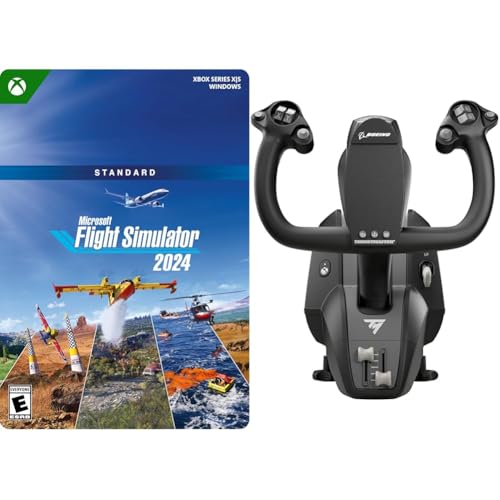
- Official Boeing 787-inspired 1:1 design
- Pendular mechanism with 8.3-inch travel
- Includes Microsoft Flight Simulator 2024 Standard
Best For: Airline-style PC simulation and new setups
Customizable PC Controller
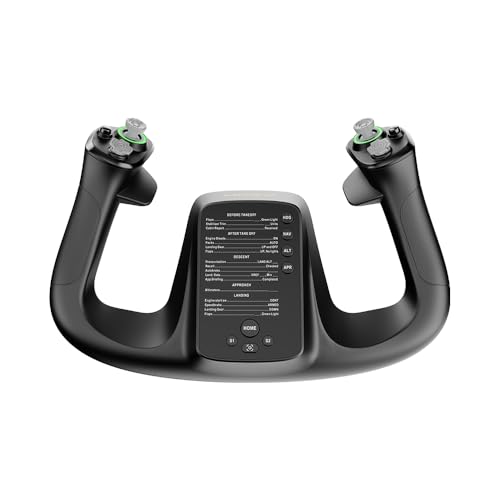
- 34 configurable inputs
- Hall Effect joystick for drift-free control
- Lightweight 1.3 kg ergonomic build
Best For: PC pilots who prioritize customization
All-in-One Setup
Turtle Beach VelocityOne Flight

- Includes yoke, throttle, trim, rudder, and brakes
- 180-degree Hall Effect yoke rotation
- Works with Windows PCs and Xbox consoles
Best For: Complete multi-control home cockpits
Professional Control – Logitech G PRO Flight Yoke System
The Logitech G PRO Flight Yoke System is a strong choice for anyone comparing flight simulator yokes for PC and looking for a traditional yoke paired with a throttle quadrant. Its realistic controls, stainless steel shaft, desk clamps, and programmable buttons support both learning and more detailed simulation setups.
Best For: New pilots and experienced sim users who want a configurable Windows yoke-and-throttle setup.
Pros:
- Includes both a flight yoke and throttle quadrant.
- Offers a stainless steel shaft with smooth, accurate control.
- Provides 14 buttons, a POV hat, and a three-position mode switch for extensive programming.
- Desk clamps provide flexible, secure mounting on compatible desks.
Cons:
- Requires optional software downloads for listed flight simulators.
- Designed for Windows rather than broad console compatibility.
Choose this model when programmable controls and a conventional yoke-and-throttle arrangement matter more than a compact all-in-one design. Its included mounting hardware also makes it practical for a dedicated desk setup.
All-in-One Learning – Thrustmaster TCA SKY YOKE for PS5 and PC
The Thrustmaster TCA SKY YOKE is an all-in-one option for shoppers seeking flight simulator yokes for PC without immediately buying separate throttle and rudder hardware. It combines seven axes, a trim wheel, rudder controls, 24 action buttons, and Hall Effect sensing in one controller.
Best For: Beginners and PS5 or PC pilots who want built-in essential controls and plug-and-play support.
Pros:
- Combines yoke, throttle, trim wheel, and rudder controls.
- Offers seven axes with 16-bit Hall Effect precision.
- Includes 24 action buttons and supports up to 180 degrees of yoke rotation.
- Supports Dual Control for two connected yokes on PS5 or PC.
Cons:
- Additional ecosystem components, including pedals and a quadrant, are sold separately.
- One-year warranty is shorter than some competing options.
This is a convenient starting point when space, simplicity, and built-in controls are priorities. It also leaves room to expand with compatible Thrustmaster accessories as your simulation needs grow.
Complete Pedal Setup – Logitech G Pro Yoke and Rudder Bundle
The Logitech G Pro Flight Yoke System and Rudder Pedals Bundle suits buyers who want more than a yoke when comparing flight simulator yokes for PC. It pairs the yoke and throttle quadrant with self-centering rudder pedals, differential toe brakes, and adjustable foot rests for a more complete control layout.
Best For: Windows users who want a ready-made yoke, throttle, and rudder-pedal package.
Pros:
- Includes the Logitech yoke, throttle quadrant, and rudder pedals.
- Self-centering pedals add realistic rudder control.
- Differential toe brakes support runway and taxi control.
- Adjustable, non-slip foot rests accommodate different foot sizes.
Cons:
- Windows compatibility limits use on other platforms.
- The bundled hardware requires more desk and floor space than a yoke alone.
This bundle is the practical choice when you want to avoid piecing together core flight controls separately. It provides the main hand and foot inputs needed for a fuller desktop simulation experience.
Console-Friendly Starter – Thrustmaster TCA SKY YOKE for Xbox and PC
The Xbox-compatible Thrustmaster TCA SKY YOKE is a flexible choice for shoppers evaluating flight simulator yokes for PC across both desktop and console play. Its seven axes, built-in throttle, trim wheel, rudder controls, and 24 buttons provide a broad set of inputs without requiring separate starter components.
Best For: Xbox Series X|S and PC users who want one yoke with built-in flight controls.
Pros:
- Works with Xbox Series X|S, PC, iOS, and Android.
- Combines seven axes with throttle, trim, and rudder functions.
- Provides 24 action buttons and Hall Effect magnetic sensing.
- Supports Dual Control with two yokes on Xbox or PC.
Cons:
- Rudder pedals and the three-axis quadrant are sold separately.
- One-year warranty is specified.
Pick this version if Xbox compatibility is important alongside PC support. It offers a straightforward starting point for Microsoft Flight Simulator 2024 and Infinite Flight, while compatible accessories can add more dedicated controls later.
Best Overall Control – Honeycomb Alpha Yoke & Switch Panel
For shoppers comparing flight simulator yokes for PC, the Honeycomb Alpha stands out with smooth 180-degree rotation, a steel shaft, and an integrated switch panel. Its broad control layout is designed for realistic general aviation simulation.
Best For: PC and Mac simmers, flight students, and pilots seeking a realistic yoke with built-in aircraft switches.
Pros:
- 180-degree rotation with dual linear ball bearings and minimal to no dead zone.
- Integrated master, alternator, avionics, lighting, and five-position ignition switches.
- Multiple hat, rocker, push-to-talk, and other controls across the handles.
- Includes heavy-duty clamps plus a clamp-free micro-suction mounting option.
Cons:
- Designed for PC, Mac, and Windows rather than Xbox.
- Its 4.9 kg weight and sizable dimensions may require a sturdy desk.
The Alpha is a strong all-around choice when smooth yoke movement and cockpit-style switches matter more than a bundled throttle quadrant.
Best for Boeing Fans – Thrustmaster TCA Boeing Yoke Pack
Among flight simulator yokes for PC, the Thrustmaster TCA Yoke Pack is tailored to airliner enthusiasts. It combines an officially licensed Boeing 787-inspired yoke with a throttle quadrant, pendular movement, and dedicated autopilot controls.
Best For: PC or Xbox pilots who want a Boeing-style cockpit setup for Microsoft Flight Simulator and other compatible flight simulators.
Pros:
- 1:1-scale Boeing 787-inspired design with an 8.3-inch range of motion.
- PENDUL_R mechanism provides smooth, suspended pendular yoke movement.
- Includes a throttle quadrant with Boeing autopilot controls for altitude, airspeed, and heading.
- Offers 35 action buttons, two additional axes, and a metal internal structure.
Cons:
- Rudder pedals are not included and must be purchased separately.
- The Boeing-focused design may be less suitable for general aviation-style setups.
This pack is especially compelling for users who want a coordinated yoke-and-throttle arrangement and Boeing-inspired controls without assembling the cockpit components separately.
Best Complete Honeycomb Setup – Alpha Yoke Bundle
For PC users seeking flight simulator yokes with matching throttle hardware, this Honeycomb bundle pairs the Alpha Flight Controls Yoke and Switch Panel with the Bravo Throttle Quadrant. It provides a broader cockpit setup in one package.
Best For: Windows simmers who want yoke, throttle, autopilot, trim, flap, and landing-gear controls together.
Pros:
- Includes both the Alpha yoke and Bravo throttle quadrant.
- Bravo supports configurable throttle setups from single-engine aircraft to four-engine commercial aircraft.
- Adds autopilot, annunciator, gear, flap, and trim controls.
- Landing-gear lever includes LED indicator lights.
Cons:
- Listed compatibility is Windows rather than Xbox.
- The combined package is relatively large and heavy, so desk space matters.
This is the most suitable option here for buyers who want to start with a more complete Honeycomb cockpit rather than purchasing a yoke and throttle separately.
Premium Boeing Pick – Thrustmaster TCA Yoke Boeing Edition Bundle
For buyers seeking flight simulator yokes for PC with an airline-style feel, this Thrustmaster bundle pairs an officially licensed Boeing yoke with Microsoft Flight Simulator 2024 Standard Edition. Its pendular mechanism and metal construction prioritize realistic movement and long-term sturdiness.
Best For: PC pilots who want a Boeing-inspired yoke and a bundled copy of Microsoft Flight Simulator 2024.
Pros:
- Officially licensed, 1:1-scale Boeing 787-inspired design.
- PENDUL_R mechanism provides an 8.3-inch range of travel.
- Adjustable springs offer smooth motion and flexible resistance.
- 100% metal internal structure supports durability and balanced control weight.
Cons:
- The bundle includes a digital game code, so it may be less appealing if you already own Microsoft Flight Simulator 2024.
- Its Boeing-specific design may not suit shoppers seeking a compact or generic controller.
This is a strong choice when realistic airline-style ergonomics matter more than a minimal setup. The included simulator also makes it a convenient starting point for a new PC flight-simulation rig.
Customizable PC Controller – MOZA Flight Controls MFY Yoke
The MOZA MFY is a PC-focused option among flight simulator yokes for PC, combining a lightweight 1.3 kg build with 34 configurable inputs. Its Hall Effect joystick, drift-free control, and customizable RGB lighting suit pilots who want flexible controls and a personalized desk setup.
Best For: PC users who value extensive input customization, precise control, and a modern ergonomic design.
Pros:
- Offers 34 configurable inputs for a broad range of flight functions.
- Hall Effect joystick is designed for drift-free precision.
- Aluminum alloy quick-release and PA66 composite materials balance comfort and durability.
- Supports elevator trim, autopilot, and rudder control.
Cons:
- The supplied details identify it as a PC product, without Xbox compatibility.
- Wireless power is listed, but the connection technology is USB; buyers should confirm their intended setup.
Choose the MFY when programmable inputs are a priority. It is especially appealing for PC pilots who want to assign more simulator functions directly to the controller rather than rely on a separate control panel.
All-in-One Setup – Turtle Beach VelocityOne Flight
The Turtle Beach VelocityOne Flight is an all-in-one choice for flight simulator yokes for PC, combining a yoke handle, throttle quadrant, trim wheel, and rudder and brake controls. Its 180-degree Hall Effect yoke, display, and clamping system are designed to simplify a complete home cockpit setup.
Best For: PC and Xbox pilots who want yoke, throttle, trim, and rudder controls in one system.
Pros:
- Combines yoke, throttle quadrant, trim wheel, rudder, and brake controls.
- 180-degree yoke rotation uses a non-contact Hall Effect sensor.
- Includes a full-color flight management display and PC status indicator panel.
- Secure clamping system fits a variety of home setups.
Cons:
- Its all-in-one design has a substantial 10-pound listed weight.
- The larger control system may require more desk space than a standalone yoke.
- It is a corded USB system, which may limit cable-free placement.
VelocityOne Flight is a practical pick for shoppers who want fewer separate peripherals. The integrated controls and broad PC and Xbox compatibility make it versatile, while the included clamp helps support a more secure home setup.
How We Picked the Best Flight Simulator Yokes for PC
We focused on the factors that matter most during regular flight simulation: PC compatibility, control layout, construction quality, mounting options, axis precision, included accessories, and overall value. We also considered whether each yoke is suited to general aviation, airliner simulation, or a broader range of aircraft.
Because simulator setups vary widely, this list includes standalone yokes, yoke-and-throttle combinations, rudder-pedal bundles, and systems that also support Xbox or mobile devices. Compatibility can vary by simulator, so check the manufacturer’s current software and game-support information before buying.
Quick Comparison
| Best For | What to Look For |
|---|---|
| First-time buyers | Simple USB setup, accessible controls, and a reasonable price |
| Complete starter cockpit | Yoke bundled with throttle controls or rudder pedals |
| Airliner enthusiasts | Realistic yoke geometry, substantial mounting, and detailed throttle controls |
| Multi-platform households | Explicit PC and console compatibility |
| Advanced builders | Accurate sensors, durable construction, adjustability, and expansion potential |
Key Buying Factors for Flight Simulator Yokes for PC
Compatibility and Software
Confirm that the yoke works with your operating system and preferred simulator, such as Microsoft Flight Simulator, X-Plane, or Prepar3D. Native profiles can simplify button mapping, while generic USB support may require more setup.
Control Range and Feel
Look for smooth pitch and roll movement, a useful travel range, and a centering mechanism that feels predictable rather than overly stiff. A yoke with adjustable sensitivity can be easier to tune for both small aircraft and larger jets.
Throttle and Rudder Integration
A standalone yoke may be all you need if you already own compatible peripherals. Otherwise, a throttle quadrant or rudder-pedal bundle can improve immersion and reduce the cost and complexity of building a complete setup.
Mounting and Desk Space
Check clamp clearance, base dimensions, cable placement, and whether the unit can remain stable during aggressive inputs. A compact design suits shared desks, while a heavier system is often preferable for a permanent cockpit.
Buttons and Expandability
Count the controls you realistically need for trim, autopilot, views, radios, and landing functions. Extra switches are useful, but only if they are easy to reach and straightforward to configure.
Who Should Buy Which Flight Simulator Yokes for PC?
Choose a basic standalone model if you want an affordable entry point and already have pedals or a separate throttle. A yoke-and-quadrant combination is better for pilots who want more realistic power and flap control without assembling several separate devices.
Pick a bundle with rudder pedals if you are starting from scratch and want a coordinated control system. Airliner-focused users should prioritize authentic throttle layouts and a stable, full-size yoke. For enthusiasts building a long-term cockpit, spend more on smooth mechanics, durable construction, mounting stability, and broad simulator support rather than choosing solely by button count.