A realistic flight simulator setup does not need a dedicated cockpit. The right yoke can deliver precise control while fitting neatly on a desk, shelf, or compact gaming station.
We compared ten space-conscious options, from standalone yokes and throttle bundles to adjustable stands and under-desk mounts. This guide focuses on footprint, compatibility, mounting flexibility, and the features that matter most when every inch counts.
Best 10 Flight Simulator Yokes for Small Spaces Picks for 2026
Compact Desk Pro

- Desk clamps secure the yoke in place
- Includes a separate throttle quadrant
- At least 54 programmable controls
Best For: Windows sim pilots wanting extensive controls on a desk
All-in-One Space Saver

- Seven axes in one controller
- Built-in throttle, trim, and rudder controls
- Works with PC, PS5, iOS, and Android
Best For: Beginners needing broad controls in limited space
Secure Mount Specialist
Honeycomb Alpha Flight Controls

- Clamp or clamp-free mounting options
- 180-degree yoke rotation
- Built-in aviation switch panel
Best For: PC and Mac users wanting realistic, flexible mounting
Complete Control Bundle
Logitech G Pro Yoke and Pedals

- Includes yoke and rudder pedals
- Adds differential toe brakes
- Provides at least 54 programmable controls
Best For: Windows users with room for desk and floor controls
Premium Boeing Realism
TCA Yoke & Quadrant Boeing Edition

- Official Boeing 787-inspired design
- 35 buttons and integrated throttle quadrant
- Smooth pendular motion with metal internals
Best For: Immersive PC or Xbox setups with enough room for a full control pack
Compact Control Focus
- Lightweight 1.3 kg standalone yoke
- 34 configurable inputs for flexible mapping
- Drift-free Hall-effect control for PC
Best For: PC users needing a manageable, configurable yoke for a smaller desk
Flexible Space Saver
Wheel Stand Pro S Flight Stand

- Adjustable and portable yoke support
- Quick-release clamps enable fast positioning
- Designed for Saitek Pro Flight yokes
Best For: Saitek owners who need a movable stand for flexible seating and storage
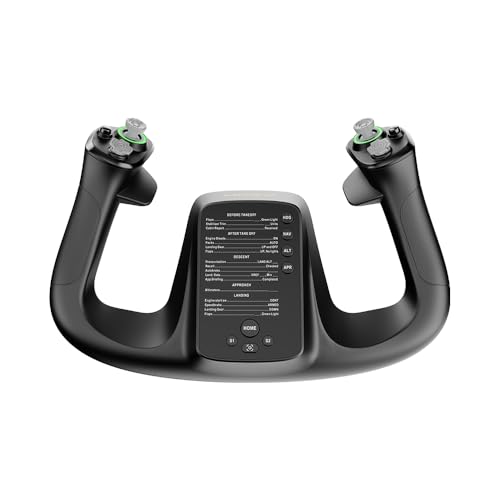
Premium Compact Control

- 4.3-inch integrated touchscreen
- 26 programmable inputs
- Hall-effect thumbsticks
Best For: PC pilots wanting advanced yoke controls in a focused setup
Under-Desk Space Saver

- Fits Honeycomb Alpha and Bravo
- Reclaims desktop space
- No-drill clamp installation
Best For: Honeycomb owners building a cleaner, compact desk setup
All-in-One Home Setup
Turtle Beach VelocityOne Flight

- Includes yoke, throttle, trim, and rudder controls
- Works with Xbox and Windows PCs
- Secure clamping system
Best For: Home pilots wanting integrated controls from one system
Compact Desk Pro – Logitech G PRO Flight Yoke
The Logitech G PRO Flight Yoke System is a practical choice for flight simulator yokes for small spaces, combining desk clamps, a yoke, and a separate throttle quadrant. Its clamp-based design helps keep the controls secure without requiring a permanent cockpit installation.
Best For: Windows users who want a versatile desk-mounted yoke with extensive programmable controls.
Pros:
- Two-position desk clamps provide flexible mounting for different desks.
- Includes a separate flight throttle quadrant for a more complete setup.
- Offers at least 54 programmable controls through buttons, a hat switch, and mode switch.
- Compatible with Windows 11, 10, 8.1, and 7.
Cons:
- The listed dimensions make it less compact than a basic yoke-only controller.
- Optional software download is required for several supported simulators.
- It is corded and designed for desktop use.
This is a strong all-around option when your small-space setup still has room for a throttle quadrant and you want broad control access without adding multiple separate flight controls.
All-in-One Space Saver – Thrustmaster TCA SKY YOKE
The Thrustmaster TCA SKY YOKE is well suited to flight simulator yokes for small spaces because it combines the yoke with throttle, trim, and rudder functions in one controller. That all-in-one approach can reduce the number of devices competing for limited desk space.
Best For: Beginners and multi-platform users who want built-in flight controls without buying several peripherals.
Pros:
- Combines seven axes with built-in throttle, trim wheel, and rudder controls.
- Provides 24 action buttons with ergonomically placed controls.
- Steel pitch axis, damping, and H.E.A.R.T. magnetic technology support smooth control.
- Supports PC, PS5, iOS, and Android, with plug-and-play recognition in supported simulators.
Cons:
- The TFRP rudder pedals and TCA SKY QUADRANT are sold separately for expanded control.
- Its listed controller type is joystick, which may not suit users seeking a traditional dedicated yoke ecosystem.
- Warranty coverage is listed as one year.
For especially tight workspaces, this is one of the most space-conscious choices in the group because essential flight functions are integrated rather than spread across several accessories.
Secure Mount Specialist – Honeycomb Alpha Flight Controls
The Honeycomb Alpha Flight Controls Yoke & Switch Panel offers a substantial desk-mounted solution for flight simulator yokes for small spaces. Its dual mounting system supports either heavy-duty clamps or a clamp-free micro-suction pad, giving you flexibility when desk access is limited.
Best For: PC and Mac simmers who prioritize realistic yoke movement and adaptable desk mounting.
Pros:
- Dual mounting solution works with steel clamps or a 3M Micro-Suction Pad.
- Full 180-degree rotation uses a steel shaft and dual linear ball bearings.
- Includes a switch panel with master, alternator, avionics, lighting, and ignition controls.
- Provides 28 buttons and multiple hat and rocker switches.
Cons:
- The listed dimensions and 4.9 kg weight may be demanding for very small desks.
- It is primarily intended for PC and Mac rather than a broad range of platforms.
- Its substantial construction may be more than casual users need.
This model makes the most sense when mounting flexibility matters as much as control realism. Measure your available surface carefully, since its sturdy construction needs adequate desk space despite its adaptable attachment options.
Complete Control Bundle – Logitech G Pro Yoke and Pedals
The Logitech G Pro Flight Yoke and Rudder Pedals Bundle gives small-space pilots a coordinated set of primary and foot controls. It is a practical option when you want to buy the yoke and pedals together, though the complete bundle requires room both on the desk and on the floor.
Best For: Windows users seeking a fuller flight-simulation setup with integrated rudder and braking control.
Pros:
- Combines the Pro Flight Yoke System with self-centering rudder pedals.
- Differential toe brakes add control during runway and taxi operations.
- Yoke controls provide at least 54 programmable controls.
- Adjustable foot rests and non-slip materials accommodate different users.
Cons:
- The pedals require additional floor space, which may challenge very compact setups.
- The bundle is listed as compatible with Windows rather than multiple platforms.
- It includes more hardware than users who only need a yoke may require.
Choose this bundle if your small-space station can accommodate floor pedals and you want a more complete control layout from the start. If desk and floor room are both severely limited, an all-in-one controller may be easier to manage.
Premium Boeing Realism – TCA Yoke & Quadrant Boeing Edition
For flight simulator yokes for small spaces, this Boeing Edition pack offers an all-in-one control setup, though its 19-by-15-by-19-inch listed dimensions call for careful desk planning. It combines a yoke, throttle quadrant, autopilot controls, and 35 action buttons for a highly immersive PC or Xbox experience.
Best For: Users who want realistic Boeing controls and have room for a larger dedicated simulator setup.
Pros:
- Officially licensed 1:1 Boeing 787-inspired yoke and quadrant.
- PENDUL_R mechanism provides smooth pendular movement with an 8.3-inch range.
- Includes 35 action buttons, two extra axes, and a throttle quadrant with autopilot functions.
- Metal internal structure supports a durable, premium feel.
Cons:
- The listed 19-by-15-by-19-inch dimensions may be demanding in a small space.
- Rudder pedals are compatible but sold separately.
- Designed for Windows and Xbox Series consoles, limiting platform flexibility.
This is the most feature-rich option here, but it is not the most compact. Measure your desk or cockpit area before choosing it for a small-space setup.
Compact Control Focus – MOZA Flight Controls MFY Yoke
Among flight simulator yokes for small spaces, the MOZA MFY stands out as a lighter, standalone PC yoke. Its 1.3 kg weight, USB connection, and streamlined control design make it easier to position and store than a full yoke-and-quadrant bundle.
Best For: PC pilots seeking a configurable yoke with a relatively easy-to-manage footprint.
Pros:
- Weighs 1.3 kg for easier handling and repositioning.
- Offers 34 configurable inputs for varied flight functions.
- Hall-effect joystick provides drift-free control, according to the supplied specifications.
- Supports elevator trim, autopilot, and rudder functions with customizable RGB lighting.
Cons:
- Compatible with PC only.
- No throttle quadrant is listed as included.
- Wireless power is listed, while connectivity is specified as USB, so setup details may require checking.
The MFY is the strongest fit for a small desk when you want many assignable controls without committing to a larger bundled cockpit system. Its PC-only compatibility is the main limitation.
Flexible Space Saver – Wheel Stand Pro S Flight Stand
For flight simulator yokes for small spaces, the Wheel Stand Pro S is a practical mounting solution rather than a yoke itself. Its adjustable frame, quick-release clamps, and portable design can help organize a Saitek Pro Flight yoke around different seating positions.
Best For: Saitek Pro Flight yoke owners who need an adjustable, portable stand for a compact or flexible setup.
Pros:
- Full, stepless adjustment range helps accommodate different seats and users.
- Quick-release clamps allow fast adjustments without turning knobs.
- Stable, portable construction is designed for long-term use.
- Handcrafted in Europe and shipped in eco-friendly plain cardboard packaging.
Cons:
- Stand only; the flight system is not included.
- Compatible with Saitek Pro Flight yokes, not Honeycomb systems.
- Its listed 27-by-16-by-5-inch dimensions may still require floor or storage space.
This stand can make a small-space setup more flexible by letting you adjust and move the yoke system, but compatibility is critical. Confirm that you own the supported Saitek model before buying.
Premium Compact Control – MOZA MFY Pro Yoke
For flight simulator yokes for small spaces, the MOZA MFY Pro focuses the controls in a compact yoke handle rather than requiring a large all-in-one cockpit. Its integrated touchscreen, programmable inputs, and Hall-effect thumbsticks make it a feature-rich choice for PC users who want flexible control in a limited setup.
Best For: PC sim pilots who want advanced controls and cockpit information in a compact yoke-focused setup.
Pros:
- Integrated 4.3-inch touchscreen can display flight information, checklists, timers, and shortcuts.
- Offers 26 programmable buttons and axes with support for multiple profiles.
- Hall-effect thumbsticks are designed for smooth, precise, drift-resistant operation.
- Carbon fiber reinforced composite construction supports control forces up to 30 kg.
Cons:
- Designed for personal computers, so it may not suit console-focused setups.
- It is a yoke handle rather than a complete throttle-and-rudder control system.
The MFY Pro is a strong space-conscious option when you value customization and integrated information more than a complete multi-control bundle. You will still need to plan for any additional controls your simulator setup requires.
Under-Desk Space Saver – Honeycomb Yoke Mount
This under-desk mount is a practical solution for flight simulator yokes for small spaces, moving compatible Honeycomb controls off the desktop surface. It uses the original clamps, requires no drilling, and is intended to keep a compact simulator station cleaner and less cluttered.
Best For: Honeycomb Alpha and Bravo owners who need to reclaim desk space without permanently modifying the desk.
Pros:
- Designed for Honeycomb Alpha yoke and Bravo throttle units.
- Under-desk positioning frees valuable desktop surface area.
- Clamp-based installation requires no drilling and uses the original hardware.
- Places the controls closer to real-world positions for a more immersive setup.
Cons:
- Compatibility is specifically centered on Honeycomb Alpha and Bravo devices.
- It is a mounting accessory, not a yoke or control system by itself.
If you already own the compatible Honeycomb hardware, this mount offers one of the simplest ways to create a more compact station. Confirm your desk and device arrangement before buying, since its main benefit depends on under-desk installation.
All-in-One Home Setup – Turtle Beach VelocityOne Flight
The Turtle Beach VelocityOne Flight combines a yoke, throttle quadrant, trim wheel, and rudder controls in one system, making it a useful consideration among flight simulator yokes for small spaces when you want multiple controls without assembling separate units. Its secure clamping system is designed for a variety of home setups.
Best For: Xbox or Windows users who want an integrated flight-control system with yoke, throttle, trim, and rudder functions.
Pros:
- Combines yoke, throttle quadrant, trim wheel, rudder, and brake controls.
- Provides 180-degree yoke rotation with a non-contact Hall-effect sensor.
- Includes a full-color flight management display and PC status indicator panel.
- Supports Xbox consoles and Windows 10 and 11 PCs.
Cons:
- Its 19.01 x 7.2 x 19.5-inch listed dimensions may require careful space planning.
- At 10 pounds, it is less lightweight than a basic yoke-only controller.
- Its broad feature set may be more than needed for users seeking only a compact yoke.
VelocityOne Flight is best viewed as an all-in-one alternative to piecing together separate controls. It can simplify a home cockpit, but measure your available desk area first because the integrated system has a substantial footprint.
How We Picked the Best Flight Simulator Yokes for Small Spaces
We focused on products that can work in apartments, shared offices, compact gaming rooms, and temporary setups. The selection includes complete control systems, yoke-and-throttle bundles, standalone yokes, and accessories designed to reclaim desk space.
Our comparison criteria included physical footprint, mounting options, platform compatibility, control layout, adjustability, setup convenience, and upgrade potential. Products that require a permanent cockpit were weighed differently from models that can be clamped, mounted under a desk, or stored after each session.
Quick Comparison
| Best For | Look For |
|---|---|
| Small desks | Compact yoke bodies, clamps, and foldable mounts |
| Complete setups | Integrated throttle quadrants or bundled rudder pedals |
| Multi-platform use | Compatibility with your PC, Xbox, PlayStation, or mobile device |
| Premium immersion | Higher-end construction, displays, and configurable controls |
| Flexible storage | Quick-release mounting and freestanding stands |
Key Buying Factors for Flight Simulator Yokes for Small Spaces
Footprint and Mounting Method
Measure the usable depth and width of your desk before buying. A compact yoke may still need room for a throttle, keyboard, monitor, and cable connections. Clamp-on systems and under-desk brackets preserve more surface area than freestanding bases. A dedicated stand can be useful when the desk is too shallow, provided it folds or stores easily.
Compatibility and Connections
Check the exact platform and operating-system support. Some controls are designed primarily for Windows PC, while others support Xbox, PlayStation, iOS, or Android. Also confirm whether the product connects by USB, requires specific software, or depends on a compatible simulator for button mapping.
Integrated Controls and Expansion
A yoke with an integrated throttle quadrant can reduce the number of devices on your desk. However, separate throttle and rudder controls may offer better positioning and easier upgrades. Consider how many programmable buttons, switches, trim controls, and axis inputs you actually need.
Stability and Adjustability
Small-space equipment should remain secure without damaging the desk. Look for firm clamps, broad contact surfaces, adjustable height, and cable routing. If multiple people use the workspace, prioritize quick removal and repeatable positioning.
Who Should Buy Which Flight Simulator Yokes for Small Spaces?
Choose a compact standalone yoke if you already own rudder pedals or want to build a setup gradually. A yoke-and-throttle bundle is better for newcomers who want the essential controls in one purchase, while a bundle that includes rudder pedals can simplify a full beginner setup.
Choose a premium yoke with a display or expanded controls if you value immersion and expect to fly regularly. A foldable stand is best when desk mounting is impractical, and an under-desk bracket is ideal for users who want maximum surface space with a semi-permanent installation.
Before ordering, verify dimensions, clamp clearance, simulator support, and return policies. The best Flight Simulator Yokes for Small Spaces are not necessarily the smallest models—they are the ones that fit securely, connect reliably, and leave enough room for the rest of your controls.